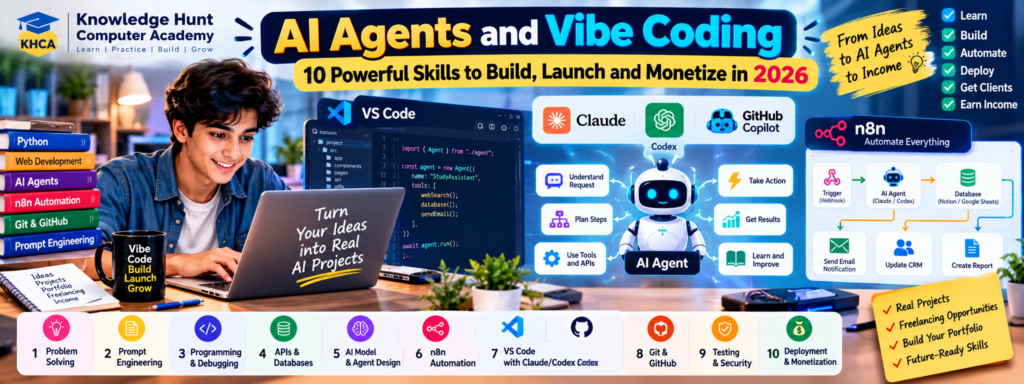
Have you ever wanted to build your own website, application, chatbot or AI assistant but felt that programming was too difficult? In 2026, AI-powered coding tools are making software development more accessible to beginners. You can describe an idea in simple language, ask an AI coding assistant to generate code, review the changes and gradually build a working application.
Thank you for reading this post, don't forget to subscribe!This approach is commonly called Vibe Coding. When combined with AI Agents, workflow automation and tools such as VS Code, Claude, Codex and n8n, it can help you create useful software for personal projects, businesses and potential clients.
However, building a successful application requires more than writing prompts. You must understand the problem, plan the solution, test the code, protect user data and maintain the application after launch.
In this guide, we will explore 10 essential skills for AI Agents and Vibe Coding. You will also learn what n8n does, how AI coding assistants work with VS Code, which GitHub repositories can help you learn, how to plan and build an AI Agent, and how to explore business opportunities around your projects.
Whether you are a student, freelancer, computer teacher, developer or aspiring entrepreneur, this guide will help you create a practical learning roadmap.
Table of Contents
1. What Is Vibe Coding?
Vibe Coding is an approach to software development in which you describe what you want to build using natural language and work with AI tools to generate, modify and debug code.
Instead of writing every line manually, you explain the goal, review the generated code, run the application, report errors and ask the AI assistant to help improve the solution.
For example, you might say:
“Build a student management application with student registration, course details, attendance records, fee tracking and an admin dashboard. Use a clean interface and store the data in a database.”
An AI coding assistant can help turn this description into a project plan, application structure and code. You then need to review the architecture, configure the database, test the features and correct problems.
How Does Vibe Coding Work?
A practical Vibe Coding process looks like this:
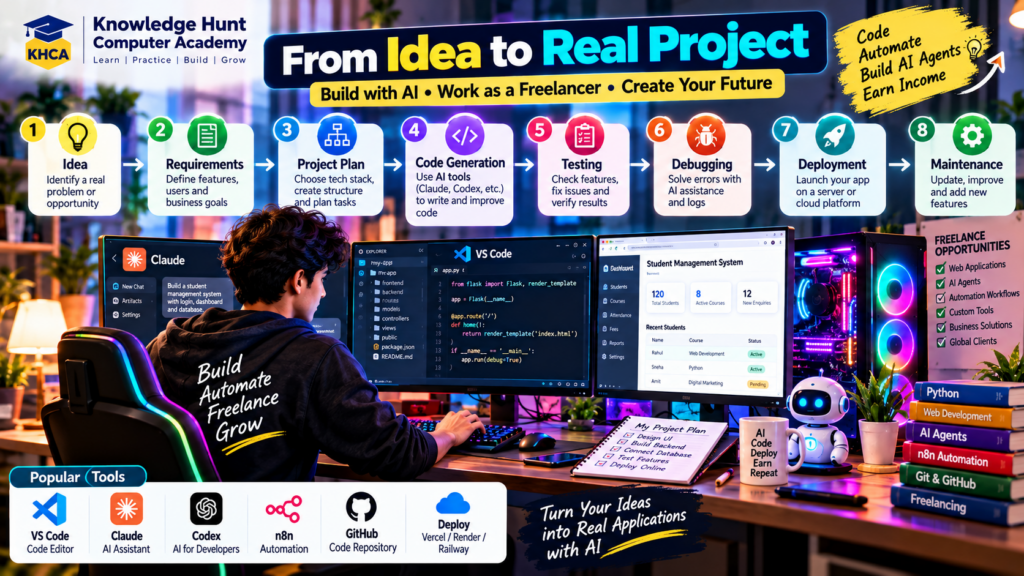
Idea → Requirements → Project Plan → Code Generation → Testing → Debugging → Deployment → Maintenance
For example, a student could create a simple expense tracker using Python. Later, the student might add a web interface, connect a database and use an AI assistant to explain errors or suggest improvements.
What Can You Build with Vibe Coding?
Depending on your skills and the tools you choose, you can build:
- Websites and landing pages
- Student management systems
- Business dashboards
- Customer support chatbots
- AI-powered document assistants
- Data analysis applications
- Workflow automation systems
- AI Agents connected to external tools
- Small SaaS applications
- Internal tools for businesses
Vibe Coding can speed up development, but generated code is not automatically secure, correct or ready for production. You remain responsible for reviewing and testing the application.
2. What Is an AI Agent?
An AI Agent is a software system that uses an AI model to work towards a defined goal. Depending on its design, it can understand a request, plan steps, use permitted tools, process information and check whether a task has been completed.
A basic chatbot usually responds to a user’s message. An AI Agent may be designed to perform a sequence of actions, such as collecting information, preparing a report and sending the result for approval.
For example, consider a student enquiry system for a computer academy.
A simple chatbot might answer a question about course fees using information supplied to it.
An AI Agent could be designed to:
- Receive a student enquiry.
- Identify the course the student is interested in.
- Retrieve the relevant course information.
- Ask for missing details.
- Prepare a suitable response.
- Save the enquiry in an authorised CRM or database.
- Notify the staff member responsible for follow-up.
This workflow requires integrations, permissions and error handling. The AI model alone does not automatically provide access to the academy’s database or messaging systems.
Main Components of an AI Agent
AI Model: Processes instructions and helps decide what to do next.
Instructions: Define the agent’s role, objective, limitations and expected behaviour.
Tools: Allow the agent to perform permitted actions, such as searching a knowledge base or calling an API.
Knowledge and Context: Supply relevant information from documents, databases or approved sources.
Workflow or Control Logic: Determines which steps run, when they run and how the results are handled.
Memory, Where Needed: Stores selected information across steps or sessions. Memory should be designed carefully to protect privacy and prevent irrelevant information from affecting future results.
Evaluation and Monitoring: Help determine whether the agent is accurate, reliable and operating as intended.
Not every agent needs all these components. Start with the simplest design that solves the problem.
3. AI Chatbot vs AI Agent vs Workflow Automation
These terms are related, but they describe different approaches.
| Type | How it works | Example |
|---|---|---|
| Chatbot | Responds to user messages using rules, an AI model or both | Answering questions about courses |
| Workflow Automation | Runs predefined steps when a trigger occurs | Sending a confirmation email after a form submission |
| AI Agent | Uses an AI model and permitted tools to work towards a goal | Reviewing an enquiry, finding relevant course information and preparing a response |
An AI Agent can operate inside a workflow. For example, a form submission may trigger an n8n workflow, which calls an AI Agent and then saves the result in a database.
Use ordinary automation when the steps are predictable. Use an AI Agent when the task needs language understanding, flexible decisions or tool selection. In some cases, a combination is the best solution.
4. 10 Essential Skills for AI Agents and Vibe Coding
You do not need to master every skill before building your first project. Learn the fundamentals and increase the complexity as your projects grow.
Skill 1: Problem-Solving and Requirements Writing
The first skill is understanding what problem you are solving.
Before asking an AI assistant to build an application, define the target users, their problems and the expected outcome.
For example, instead of saying, “Build an AI Agent for my business,” write:
“Build a course enquiry assistant for a computer academy. It should answer questions using approved course information, collect an interested student’s name and contact details with consent, and send the enquiry to staff for review. It must not invent course fees or promise admission.”
This is a clearer starting point.
Learn to define:
- The problem and target users
- Required features
- Inputs and expected outputs
- User roles and permissions
- Business rules
- Success criteria
- What the system must not do
Good requirements reduce confusion and unnecessary changes during development.
Skill 2: Prompt Engineering and Context Management
Prompt engineering means giving AI systems clear instructions and useful context. In Vibe Coding, this includes explaining the project structure, existing technologies, design requirements and expected behaviour.
A useful coding prompt contains:
- Goal: What needs to be built?
- Context: What technologies and files already exist?
- Requirements: Which features are necessary?
- Constraints: What must remain unchanged?
- Acceptance criteria: How will you know the work is correct?
- Testing: What should be checked before the task is complete?
For example:
“First inspect the existing project. Explain its current architecture before editing files. Add a course enquiry form using the existing design system. Validate required fields, show clear error messages, connect it to the current backend and add tests. Do not change unrelated pages. After implementation, list the files changed and the tests performed.”
This prompt encourages the coding assistant to inspect the project rather than immediately generating unrelated code.
Practical exercise: Ask an AI assistant to create a small calculator, then ask it to add input validation, test cases and a short README. Compare the results and learn how clearer instructions improve the workflow.
Skill 3: Basic Programming and Debugging
Vibe Coding can reduce the amount of code you need to write manually, but programming knowledge helps you understand what the AI creates.
Choose a language according to your project.
- Python: Useful for automation, data processing, backend development and AI applications.
- JavaScript or TypeScript: Useful for web applications and interactive interfaces.
- SQL: Useful for querying and managing relational databases.
- HTML and CSS: Useful for understanding and adjusting web interfaces.
Learn variables, functions, conditions, loops, data structures, error handling, APIs and basic testing.
You should also learn to read error messages, inspect logs and reproduce bugs. If an AI assistant fixes an error, ask it to explain the cause and how to prevent the problem in the future.
You do not need to become an expert programmer before starting, but you should gradually understand the code your application depends on.
Skill 4: APIs, Databases and Integrations
Most useful AI Agents need information from other systems.
An API allows one application to communicate with another. A database stores information such as users, products, course records and customer enquiries.
Learn the basics of:
- HTTP requests and responses
- REST APIs
- JSON data
- API authentication
- Environment variables
- Database tables and relationships
- SQL queries
- Webhooks
- Error handling and retries
For example, an AI Agent might receive a request through a web form, retrieve course information from a database and prepare a response.
The agent should only access the information and actions it is authorised to use. Never place secret API keys directly in publicly shared source code.
Skill 5: AI Models and Agent Design
Learn what a language model can do, where it can fail and how it interacts with tools.
Understand the difference between:
- A model that generates text
- A model that uses structured tool calls
- A workflow that executes predefined steps
- An agent that can choose among permitted actions
- A multi-agent system where specialised agents coordinate tasks
Start with a single-agent design. Multiple agents introduce additional complexity, cost, coordination problems and failure points. Use them only when separate responsibilities genuinely improve the result.
Learn how to provide reliable knowledge to the agent, validate its outputs and handle situations where it does not know the answer.
Skill 6: n8n and Workflow Automation
n8n is a workflow automation platform that connects applications, APIs and services through visual workflows. It is useful for connecting triggers, data-processing steps, AI models and external tools.
For example, an n8n workflow could receive a website form submission, classify the enquiry using an AI model, save the details in a spreadsheet or CRM and notify the appropriate staff member.
Learn how to work with triggers, nodes, credentials, HTTP requests, webhooks, conditions, data mapping, error handling and workflow execution logs.
You can build simple automations before introducing AI. Once the basic workflow works reliably, add an AI component where flexible language understanding or decision-making is useful.
Skill 7: VS Code and AI Coding Assistants
Visual Studio Code (VS Code) is a code editor that supports extensions, terminals, debugging and AI-assisted development.
AI coding assistants can help you inspect code, generate features, explain errors and work across multiple files. VS Code’s current agent documentation describes supported workflows involving Copilot, Claude and Codex, although authentication and availability depend on the chosen setup. See the official VS Code AI development guide.
Learn to:
- Open and inspect an existing project
- Use the integrated terminal
- Install and manage extensions
- Review changes made by an AI assistant
- Run tests and inspect output
- Use Git to track changes
- Keep project instructions in appropriate files
- Work with APIs and environment variables securely
Treat AI-generated code as a draft that requires review. Official VS Code guidance also recommends testing generated changes and checking for security issues before integrating them. See Best practices for using AI in VS Code.
Skill 8: Git and GitHub
Git is a version control system that tracks changes to your code. GitHub is a platform for hosting repositories and collaborating on software projects.
A repository is a project space containing files, code history and related project information. Depending on its configuration, it may also include issues, documentation, releases and contribution instructions.
Learn how to:
- Create a repository
- Commit changes
- Create branches
- Review diffs
- Revert unwanted changes
- Write a README
- Manage issues and pull requests
- Protect secrets and sensitive files
- Understand open-source licences
Before allowing an AI coding assistant to modify a large project, create a Git checkpoint or commit your working changes. This gives you a clearer way to review and recover from mistakes.
Skill 9: Testing, Security and Reliability
An application can appear to work while still containing serious problems.
Testing checks whether the application behaves as expected. Security controls help prevent unauthorised access, data exposure and misuse.
For an AI Agent, test more than the ideal case. Check what happens when the model produces an incorrect answer, an API is unavailable, a user submits invalid information or an external service returns an error.
Important practices include:
- Input validation
- Authentication and access control
- Secure storage of credentials
- Rate limits and usage limits
- Logging and error handling
- Automated tests
- Human approval for sensitive actions
- Monitoring and recovery procedures
For example, an agent that drafts an email should not automatically send sensitive or high-impact messages without the required permissions and approval process.
Skill 10: Deployment, Product Thinking and Business Communication
A working application on your computer is not necessarily ready for customers.
Deployment makes an application available in its intended environment. Product thinking helps you decide which problem to solve and which features are worth building.
Learn the basics of hosting, domain configuration, environment variables, backups, monitoring and ongoing maintenance.
You should also be able to explain:
- The problem your product solves
- Who benefits from it
- How the workflow operates
- What information it needs
- What the customer receives
- What the system cannot do
- How much it costs to operate
- How the product will be supported
Technical ability matters, but clients also need clear communication, realistic expectations and reliable delivery.
5. What Is n8n and How Does It Work?
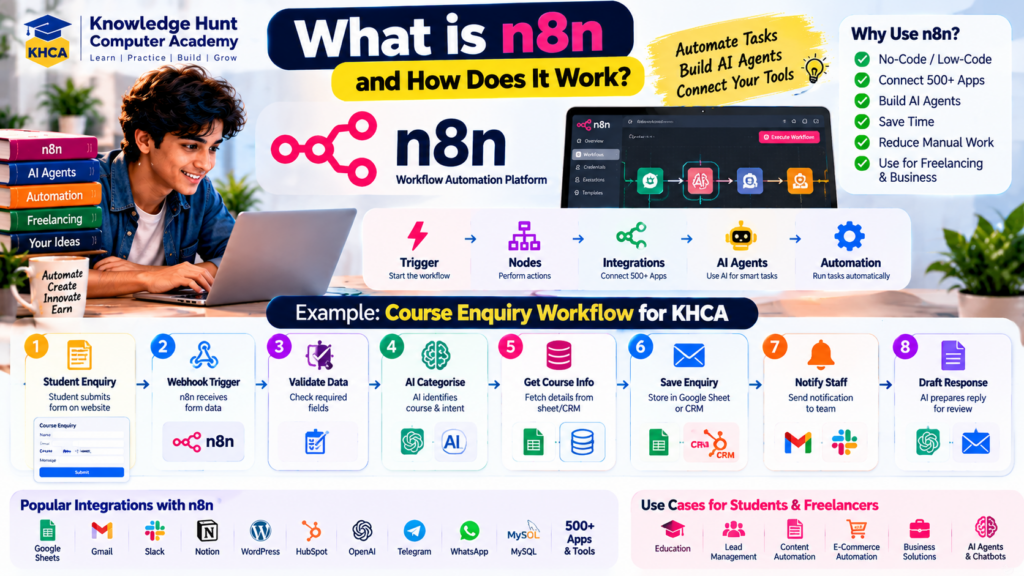
n8n is a visual workflow automation platform that connects services and automates tasks. Its workflow editor uses nodes to represent triggers, operations, conditions and integrations.
You can explore n8n through its official website at n8n.io and read its documentation at docs.n8n.io.
Important n8n Concepts
Workflow: A connected sequence of steps that performs a task.
Trigger: An event that starts a workflow, such as a form submission, a scheduled time or an incoming webhook.
Node: A component that performs an operation, such as retrieving information, checking a condition or sending a notification.
Credentials: Authentication information used to connect to external services. Credentials must be protected.
Webhook: An endpoint that can receive data from another application and trigger a workflow.
AI Agent Node or AI Integration: A component or connected set of components that uses an AI model and, where configured, tools to handle a task. Available features depend on the current n8n version and integrations.
Example: Build a Course Enquiry Workflow
Suppose Knowledge Hunt Computer Academy wants to organise enquiries from its website.
A simple workflow could be:
- A student submits an enquiry form.
- n8n receives the form data.
- A validation step checks the required fields.
- An AI component categorises the enquiry, if needed.
- The workflow retrieves approved course information.
- The enquiry is saved to an authorised spreadsheet or CRM.
- A notification is sent to the responsible staff member.
- A draft response is prepared for review.
This design can reduce repetitive work, but it needs error handling, appropriate access permissions and a clear process for incorrect or incomplete information.
How to Start Learning n8n
- Open the official n8n website and review its current setup options.
- Learn how to create a basic workflow.
- Add a trigger and a few simple nodes.
- Connect a test service using authorised credentials.
- Run the workflow with sample data.
- Add error handling and inspect execution logs.
- Introduce an AI component after the basic workflow works reliably.
- Test the workflow before connecting real customer data.
n8n offers different hosting and licensing arrangements. Review the current licence and usage terms before deploying or selling a solution, especially if you plan to host it for customers or offer a managed service.
6. How to Use Claude or Codex with VS Code
VS Code is a code editor. Claude and Codex are AI coding options that can help you work with a project. They are not simply database connections; they use supported integrations, authentication and permissions to interact with code and development tools.
VS Code’s official documentation describes agent workflows and supported setup options. The precise installation and account requirements can change, so always check the current documentation before configuring your environment.
General Setup Process
Step 1: Install VS Code
Download VS Code from the official website:
Install it and open your project folder.
Step 2: Prepare Your Project
Create or open a project folder. If it is an existing application, inspect the files and make a backup or Git commit before making major changes.
Step 3: Choose Your AI Coding Assistant
You can explore supported agent workflows in VS Code or use a provider’s own coding tool or extension.
- Claude-related workflows may require a supported Claude account, API key or another permitted authentication method.
- Codex workflows may require a ChatGPT sign-in or another supported setup, depending on the interface and integration.
- GitHub Copilot has its own account, subscription and usage arrangements.
Do not assume that one subscription automatically includes every provider’s features or usage.
Step 4: Complete Authentication
Follow the official setup instructions for the integration you selected. Never paste your password, API key or one-time password into an unrelated prompt.
Step 5: Open the Project in the AI Assistant
Ask the assistant to inspect the project and explain its architecture before making changes.
Step 6: Give a Small, Specific Task
For example:
“Inspect this project and explain the current folder structure, framework, database and how to run the application. Do not modify files yet.”
After reviewing the explanation, ask it to implement one feature at a time.
Step 7: Review and Test Changes
Inspect the code diff, run the application, execute tests and review errors before accepting the changes.
Example Prompt for Claude or Codex
“Act as a senior software engineer. First inspect the existing project and explain its architecture, dependencies and current state. Do not delete or replace existing files without explaining why. Propose a short implementation plan before coding. Implement only the requested feature, reuse the current design and coding conventions, add appropriate tests, and explain how to verify the result. Never expose credentials or modify production data.”
You can adapt this prompt to your application and add specific requirements.
For more information, see the official VS Code agent overview and AI development best practices.
7. Useful GitHub Repositories for AI Development
GitHub repositories can provide starter projects, examples, reusable workflows, frameworks and learning resources. They are useful for understanding how real projects are structured, but you should not blindly copy code into a production application.
The following repositories are useful starting points. They are not a permanent ranking; project activity, compatibility, licence terms and quality can change.
1. n8n — Workflow Automation
Repository: https://github.com/n8n-io/n8n
The main n8n repository is useful for exploring the workflow automation platform, its source code and development activity.
Use it for: Understanding workflow automation and the platform behind visual integrations.
Beginner tip: Start with the official n8n documentation and templates before trying to modify the core platform.
2. n8n Self-Hosted AI Starter Kit
Repository: https://github.com/n8n-io/self-hosted-ai-starter-kit
This project provides a starting point for exploring a self-hosted AI environment involving n8n and related services. Review the current repository instructions to understand the included components and requirements.
Use it for: Learning how workflow automation can be combined with AI services and supporting infrastructure.
Beginner tip: Read the installation instructions and check the system requirements before using Docker or running the stack.
3. Awesome n8n Templates
Repository: https://github.com/enescingoz/awesome-n8n-templates
This community-maintained collection brings together examples of n8n workflows and automation ideas.
Use it for: Discovering possible workflows for email, content, chatbots, data processing and business automation.
Beginner tip: Import a template only after understanding its nodes, credentials, external connections and actions. Review the current licence and any third-party dependencies.
4. OpenAI Agents SDK for Python
Repository: https://github.com/openai/openai-agents-python
This repository contains the OpenAI Agents SDK for Python.
Use it for: Exploring code-based AI Agent development, tool use and structured agent workflows.
Beginner tip: Start with a small example and understand how tools, instructions, execution and error handling work before building a complex multi-agent system.
5. Anthropic Cookbook
Repository: https://github.com/anthropics/anthropic-cookbook
This repository contains examples and recipes for working with Anthropic models and related capabilities.
Use it for: Learning through practical examples involving model usage and AI application patterns.
Beginner tip: Follow the current setup instructions and keep any API credentials outside the repository.
6. LangChain
Repository: https://github.com/langchain-ai/langchain
LangChain provides tools and abstractions for developing applications that use language models.
Use it for: Exploring model integrations, retrieval, tool use and application patterns.
Beginner tip: Do not add a framework simply because it is popular. First decide whether your application needs its features.
7. Vercel AI SDK
Repository: https://github.com/vercel/ai
The Vercel AI SDK supports building AI-powered applications, particularly in web development environments.
Use it for: Exploring chat interfaces and AI features in web applications.
Beginner tip: Check the current framework support, package versions and examples before integrating it into your project.
8. 500 AI Agents Projects
Repository: https://github.com/ashishpatel26/500-AI-Agents-Projects
This repository collects examples and ideas related to AI Agent applications.
Use it for: Discovering possible projects and identifying business problems that agents may help solve.
Beginner tip: Treat project ideas as learning inspiration. Verify the current implementation, dependencies and licence before using any code.
9. Awesome Vibe Coding
Repository: https://github.com/taskade/awesome-vibe-coding
This curated resource collects Vibe Coding tools, development resources, prompt references and related projects.
Use it for: Discovering coding assistants, templates and learning materials.
Beginner tip: Compare tools based on your workflow, account requirements, cost, data handling and compatibility with your project.
10. Superpowers
Repository: https://github.com/obra/superpowers
Superpowers is a repository focused on structured workflows and skills for AI-assisted software development.
Use it for: Exploring more systematic approaches to planning, implementing and reviewing software with coding agents.
Beginner tip: Read the installation instructions and supported environments before adopting it in a project.
How to Evaluate Any GitHub Repository
Before using a repository, check:
- The README and installation instructions
- The licence and permitted uses
- The last meaningful update and recent issues
- Required versions of languages and packages
- Open issues and known limitations
- Security concerns and external dependencies
- Whether API keys or credentials are required
- Whether the project suits your actual requirements
GitHub recommends using a README to explain a project and offers security features for managing repository risks. See its repository best practices and licensing guidance.
An open-source repository is not automatically free of restrictions. Check the licence before copying, modifying, distributing or selling software based on it.
8. How to Build Your First AI Agent
Beginners should start with a small problem rather than trying to create a fully autonomous assistant that can do everything.
For this example, imagine building an AI Agent that helps a computer academy answer common course enquiries.
Step 1: Define the Problem
The goal is to help students find approved information about courses and prepare enquiries for staff.
The agent should answer questions about course descriptions, available schedules and published fees only when the relevant information exists in an approved source.
It should not invent prices, promise admissions or make decisions that require staff approval.
Step 2: Choose the Development Approach
You can build a simple prototype using a visual workflow tool such as n8n or develop a code-based application using Python and an appropriate AI integration.
Choose based on the complexity of the task, your programming knowledge, hosting requirements and maintenance needs.
Step 3: Prepare the Knowledge Source
Create a structured, approved source containing information such as:
- Course names and descriptions
- Published fees and conditions
- Eligibility requirements
- Available contact channels
- Frequently asked questions
Add a process for updating information when courses, prices or schedules change.
Step 4: Design the Workflow
A basic workflow may look like this:
Student Question → Input Validation → Retrieve Approved Information → AI Response → Response Checks → Reply or Staff Review
The workflow should have a clear response when information is missing. For example, it can say that the details need confirmation rather than inventing an answer.
Step 5: Connect the Required Tools
Depending on the application, you may need:
- A website chat interface
- An AI model
- A document store or database
- An API or workflow automation tool
- A secure way to manage credentials
- An authorised communication channel
Add only the integrations required for the first version.
Step 6: Add Safety Rules
Define what the agent can and cannot do.
For example:
- It can retrieve approved course information.
- It can draft a response to a student.
- It can prepare an enquiry for staff.
- It cannot invent course fees.
- It cannot expose another student’s information.
- It cannot confirm admission without an authorised process.
Step 7: Test the Agent
Test normal questions, incomplete questions, incorrect inputs, missing data and attempts to make the agent ignore its instructions.
Record incorrect answers and improve the knowledge source, instructions or workflow.
Step 8: Deploy a Limited Version
Run the application in a test environment first. After testing, deploy it with appropriate access controls, monitoring and a way for staff to report problems.
Start with a small group of users before expanding to more customers.
9. Requirements to Check Before Building an AI Agent
A successful agent begins with a clear specification. Before coding, write down the following requirements.
Functional Requirements
These describe what the agent must do.
Examples include receiving questions, searching approved information, preparing responses and creating an enquiry record.
Non-Functional Requirements
These describe how well the system must work.
Consider response time, reliability, expected usage, availability, accuracy, accessibility and maintenance needs.
Data Requirements
Decide what information the agent needs, where it will come from, who owns it and how frequently it must be updated.
Use only authorised data. Minimise the collection of personal information and define how long records should be retained.
Integration Requirements
List the required APIs, databases, messaging platforms and other systems. Confirm that the required permissions and access methods are available.
Security Requirements
Consider authentication, role-based permissions, secret management, input validation, data privacy and protection against malicious instructions in user input or retrieved documents.
Cost Requirements
Estimate the cost of AI model usage, hosting, database storage, workflow execution, third-party APIs and ongoing maintenance.
Include limits that help prevent unexpected usage charges.
Evaluation Requirements
Define how you will measure success.
Possible measures include:
- Percentage of questions answered correctly
- Frequency of unsupported answers
- Successful workflow completion rate
- Response time
- Cost per completed task
- Number of tasks requiring human intervention
- User satisfaction
Human Approval Requirements
Decide which actions the agent can perform automatically and which need approval.
Actions involving payments, account changes, confidential data, public communications or other consequential operations should have appropriate safeguards and approval steps.
10. Testing, Security and Deployment
A demo can work well with a few examples but fail when real users provide unexpected input. Testing should be part of development from the beginning.
Test Different Situations
Check what happens when:
- A user submits incomplete information.
- The AI gives an incorrect or irrelevant answer.
- A database is unavailable.
- An external API returns an error.
- A user requests information they are not authorised to access.
- The agent receives conflicting instructions.
- A workflow runs more than once.
- The system reaches a usage or cost limit.
Protect Credentials
Store API keys and passwords in appropriate secret-management or environment-variable systems. Do not commit them to a public GitHub repository or include them in client-facing documentation.
Review AI-Generated Code
Read the generated code, run tests and inspect security-sensitive areas. Pay particular attention to authentication, database access, input validation and external tool permissions.
Monitor the Agent After Launch
Record useful operational information without unnecessarily collecting sensitive user data. Monitor failures, usage, cost and response quality.
Provide a way to stop a malfunctioning workflow, disable integrations and restore a previous version when needed.
Prepare for Maintenance
AI models, APIs, packages and platform terms can change. A client solution needs ongoing maintenance, updates and support rather than a one-time code delivery.
11. How to Sell AI Agents and Generate Income
Building an agent is only one part of creating a business. You also need to identify a real problem, find customers, explain the value and deliver a reliable solution.
There is no guaranteed income from AI Agents or Vibe Coding. Revenue depends on customer demand, quality, competition, pricing, operating costs and your ability to find and retain clients.
Model 1: Custom AI Agent Development
Build a solution for a specific client.
Examples include a course enquiry assistant, a document-search assistant or an internal support tool.
You can charge for discovery, development, testing and deployment. Make the scope and acceptance criteria clear before starting.
Model 2: Workflow Automation Services
Help businesses reduce repetitive work using tools such as n8n and supported integrations.
Examples include form processing, report preparation, lead routing and notification workflows.
Charge according to the agreed project scope, complexity and support requirements.
Model 3: Monthly Maintenance and Support
Once a system is deployed, clients may need monitoring, bug fixes, updates and changes.
You can offer a monthly support plan that clearly defines included services, response times, usage limits and extra charges.
Model 4: Reusable Templates
Create and sell workflow templates, starter projects, documentation or setup guides that customers can adapt to their needs.
Before distributing templates, verify the licence of every included component and remove credentials, private information and client-specific content.
Model 5: SaaS Product
A Software as a Service (SaaS) product offers an application to multiple customers, often through a subscription.
For example, you might build a simple appointment assistant for a particular type of business.
SaaS requires more than coding. You must consider authentication, billing, customer support, data isolation, security, hosting and ongoing maintenance.
Model 6: Training and Consulting
If you develop sufficient expertise, you may teach businesses or students how to use AI tools, automate workflows and build practical applications.
Be transparent about your experience and the limitations of your services.
How to Find Your First Client
- Choose a specific industry or customer type.
- Interview potential customers to understand a recurring problem.
- Build a small demonstration using fictional or authorised data.
- Show how the solution works and explain its limitations.
- Agree on requirements, price, deadlines and support terms.
- Deliver a tested solution and collect feedback.
- Improve the service before offering it to more customers.
Example: AI Enquiry Assistant for a Training Institute
Suppose a training institute receives many repeated questions about courses.
You build a small assistant that retrieves approved course information, prepares responses and organises enquiries for staff review.
Your proposal can explain:
- The current problem
- The features included
- The services and accounts required
- The setup and maintenance costs
- The privacy and security arrangements
- The limits of the agent
- The expected evaluation process
Do not promise that the agent will eliminate all staff work or guarantee a specific increase in sales. Measure the actual results and report them honestly.
How to Set Your Price
Consider the development time, complexity, hosting, AI usage, integrations, testing, support and business value.
For a fixed-price project, define the deliverables, number of revisions, payment milestones and acceptance criteria. For recurring services, specify monthly limits and what happens when usage exceeds them.
A small, well-defined project can be a better first offer than a large system with unclear requirements.
12. A 30-Day Learning Roadmap
This plan is designed for beginners who want to explore AI Agents and Vibe Coding through practical work.
Days 1–7: Learn the Basics
- Install VS Code.
- Learn basic Git and GitHub.
- Explore AI coding assistants and their account requirements.
- Learn how to write clear coding prompts.
- Build a simple webpage or Python program.
- Run and test the project.
Goal: Understand the development workflow and learn to review AI-generated code.
Days 8–14: Explore Automation and APIs
- Learn HTTP requests and JSON.
- Understand basic API authentication.
- Create a simple n8n workflow.
- Connect a test trigger to a few processing steps.
- Learn how to handle errors.
- Document your workflow.
Goal: Complete a working automation without relying on complex AI behaviour.
Days 15–21: Build a Small AI Agent
- Define a specific use case.
- Prepare a small approved knowledge source.
- Connect an AI model using an authorised method.
- Add only the tools the agent needs.
- Test normal and unexpected inputs.
- Add human approval where appropriate.
Goal: Create a limited agent prototype and document its strengths and limitations.
Days 22–30: Prepare a Portfolio Project
- Improve the interface or workflow.
- Add error handling and basic security checks.
- Test the main use cases.
- Write a README.
- Record a demonstration using sample data.
- Publish only what you are authorised to share.
- Identify potential customers who may benefit from the solution.
Goal: Have one demonstrable project and a clear explanation of the problem it solves.
Thirty days is a starting point, not a guarantee of mastery or income. Continue learning, testing and improving your projects.
13. Common Mistakes to Avoid
1. Building Before Understanding the Problem
A detailed application can still fail if it solves the wrong problem. Speak to intended users and define requirements before coding.
2. Trusting AI-Generated Code Without Testing
AI can introduce bugs, insecure patterns and incorrect assumptions. Review changes and run suitable tests.
3. Giving Agents Too Much Permission
An agent should have only the access required for its task. Use approval steps for important external actions.
4. Copying GitHub Projects Without Reviewing Them
Check the README, licence, dependencies, maintenance status and security implications before adopting a repository.
5. Using Too Many Tools at Once
Start with one coding assistant, one development environment and one workflow tool. Add complexity only when it solves a real need.
6. Ignoring Operating Costs
AI API calls, hosting, third-party services and maintenance can create recurring expenses. Estimate these costs before selling the solution.
7. Promising Guaranteed Results
Do not guarantee income, perfect accuracy or complete automation. Describe what the system can do, what it cannot do and how results will be evaluated.
8. Forgetting Maintenance
An agent that works today may need updates tomorrow. Plan for support, monitoring, security updates and changes to external services.
14. Frequently Asked Questions
1. Can beginners use Vibe Coding without knowing programming?
Yes, beginners can start with small projects using natural-language instructions and AI coding assistants. However, learning basic programming, debugging, testing and security becomes increasingly important as applications grow.
2. What is the difference between Vibe Coding and traditional coding?
Traditional coding often involves writing and modifying code directly. Vibe Coding uses natural-language instructions and AI-generated code as a larger part of the development process. Both approaches still require testing, review and maintenance.
3. Can I build an AI Agent using n8n without programming?
You can build many workflows using n8n’s visual interface and supported integrations. More complex projects may require JavaScript, Python, APIs or custom integrations.
4. Can I use Claude or Codex inside VS Code?
VS Code supports several AI-assisted development options, including Claude and Codex agent workflows in supported configurations. The exact setup, authentication and billing requirements depend on the selected integration. Consult the official VS Code documentation before installing or configuring a tool.
5. Are GitHub repositories free to use commercially?
Not always. Check each repository’s licence and the terms of its dependencies. A public repository without a licence does not automatically grant permission to reuse or sell its code.
6. What kind of AI Agent should a beginner build first?
Start with a small agent that answers questions from an approved knowledge source or prepares a report from sample data. Avoid beginning with systems that handle payments, confidential records or consequential decisions.
7. Can I sell AI Agents to local businesses?
You can explore offering solutions to local businesses if you can deliver them reliably and comply with relevant laws, contracts, platform terms and privacy requirements. Begin by understanding the client’s problem and demonstrating a limited, tested solution.
8. How can AI Agents generate income?
Possible business models include custom development, workflow automation, maintenance services, reusable templates, SaaS products and training. Revenue is not guaranteed and depends on market demand, product quality, costs and customer acquisition.
9. Do AI Agents always work independently?
No. Their level of autonomy depends on their design, tools, permissions and safeguards. Some require human approval for most actions, while others can perform a limited sequence of tasks automatically.
10. Is n8n suitable for commercial projects?
n8n can be used in different deployment arrangements, but its current licence and usage terms matter. Review the official licensing information before hosting workflows for clients, redistributing software or offering a managed service.
Conclusion
AI Agents and Vibe Coding offer exciting ways to explore software development, automation and new business ideas. But successful projects require more than a good prompt or a popular coding tool.
Start by learning requirements writing, prompt engineering, programming fundamentals, APIs, workflow automation, GitHub, testing and deployment. Use VS Code with a supported AI coding assistant to build small projects, and explore n8n when you need to connect services through automated workflows.
Study useful GitHub repositories, but review their licences, dependencies and security before using them. Build one practical agent that solves a clearly defined problem, test it with different inputs and document its limitations.
If you want to turn your skills into a business, begin by understanding a customer’s real needs. Develop a focused solution, calculate its operating costs, agree on the deliverables and provide support after launch.
You do not need to build the most advanced AI system to get started. A small, reliable application that solves a genuine problem is a better foundation for learning, freelancing and entrepreneurship.
At Knowledge Hunt Computer Academy (KHCA), students can explore programming, computer applications and emerging technologies to strengthen their practical skills. Keep learning, build responsibly and turn your ideas into useful projects.
Official and Useful Resources
Development Tools
- Visual Studio Code: https://code.visualstudio.com/
- VS Code AI Agent Guide: https://code.visualstudio.com/docs/agents/overview
- VS Code AI Best Practices: https://code.visualstudio.com/docs/agents/best-practices
- GitHub: https://github.com/
- GitHub Repository Best Practices: https://docs.github.com/en/repositories/creating-and-managing-repositories/best-practices-for-repositories
- GitHub Licensing Guide: https://docs.github.com/en/repositories/managing-your-repositorys-settings-and-features/customizing-your-repository/licensing-a-repository
AI and Workflow Automation
- n8n: https://n8n.io/
- n8n Documentation: https://docs.n8n.io/
- OpenAI Developers: https://developers.openai.com/
- OpenAI Agents SDK for Python: https://github.com/openai/openai-agents-python
- Anthropic Documentation: https://docs.anthropic.com/
- Anthropic Cookbook: https://github.com/anthropics/anthropic-cookbook
GitHub Learning Projects
- n8n Source Code: https://github.com/n8n-io/n8n
- n8n Self-Hosted AI Starter Kit: https://github.com/n8n-io/self-hosted-ai-starter-kit
- Awesome n8n Templates: https://github.com/enescingoz/awesome-n8n-templates
- LangChain: https://github.com/langchain-ai/langchain
- Vercel AI SDK: https://github.com/vercel/ai
- 500 AI Agents Projects: https://github.com/ashishpatel26/500-AI-Agents-Projects
- Awesome Vibe Coding: https://github.com/taskade/awesome-vibe-coding