By Knowledge Hunt Computer Academy (KHCA)
Thank you for reading this post, don't forget to subscribe!
Are you interested in website development, software development or building your own web application? Have you ever wondered how a website works when you log in, search for information, make a payment or download a file?
The answer is connected to Full Stack Development.
Full Stack Development is one of the most useful skills for people who want to understand how modern websites and web applications are designed, developed, connected and published on the internet. It includes frontend development, backend development, databases, APIs, security, testing and deployment.
In this complete guide, we will understand Full Stack Development from the beginning. We will also explore the programming languages, development tools, system architecture, connections between different components, practical projects and a step-by-step learning roadmap.
Whether you are a college student, a beginner, a working professional or someone planning to enter the IT industry, this guide will help you understand the complete picture.
Table of Contents
1. What Is Full Stack Development?
Full Stack Development is the process of building both the frontend and backend of a website or web application, along with working with databases and other supporting technologies.
To understand it easily, imagine that you want to create an online education portal.
Students should be able to register, log in, view courses, watch lessons, attempt tests and check their results. Teachers should be able to upload lessons and manage assignments. The administrator should be able to manage students, courses and payments.
To build such a system, we need different components working together.
- Frontend: The pages, buttons, forms and dashboards that users see.
- Backend: The logic that processes requests and manages application rules.
- API: The communication layer between different parts of the application.
- Database: The system that stores users, courses, results and other records.
- Security: The mechanisms that protect accounts and information.
- Deployment: The process of making the application available online.
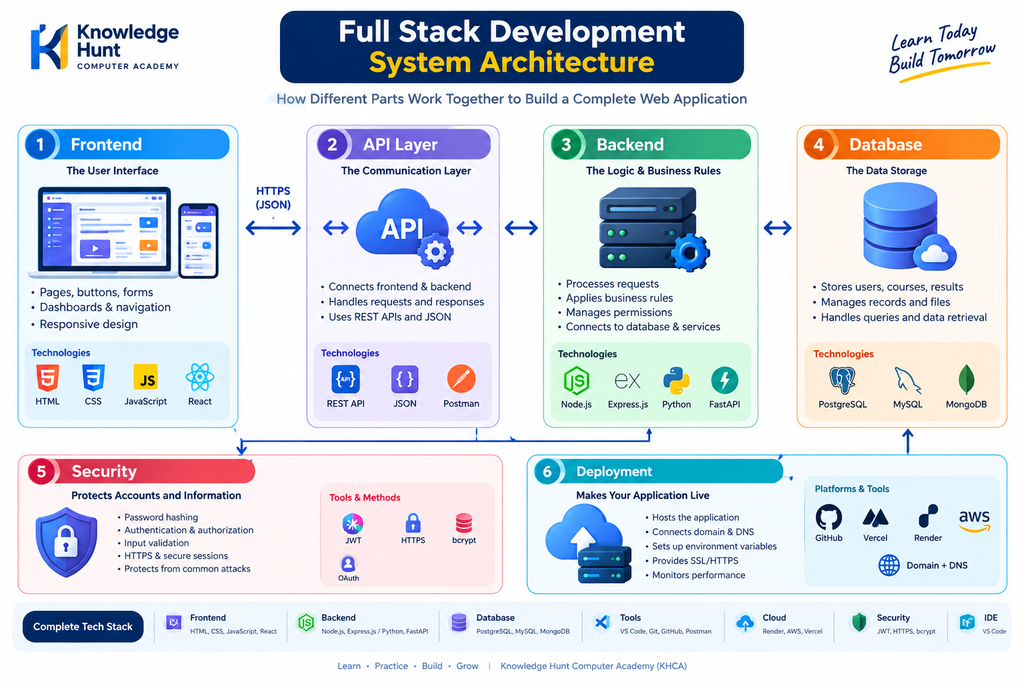
A Full Stack Developer understands how these components work together and can build features across the complete application.
You do not need to learn every programming language or framework available. The important thing is to understand the complete system and become comfortable with one suitable technology stack.
2. How Does a Website Work?
Before learning programming languages, let us understand what happens when you open a website.
Suppose you open an online learning website in Google Chrome.
First, you enter the website address in the browser. The browser uses DNS to find the appropriate server address. It then establishes a secure connection when HTTPS is used and sends a request to the website.
Depending on the application, the server may return a webpage directly or the frontend may make additional requests to backend APIs.
The backend processes these requests, retrieves or updates information in the database when needed and returns a response. The browser then displays the information to the user.
For example, when you open a course page, the website may retrieve the course title, description, price and available lessons from a database through the backend.
This complete process allows users to interact with applications on the internet.
3. The Complete Full Stack Development System
A typical web application can be understood through the following architecture.
User → Frontend → API → Backend → Database → Backend → Frontend → User
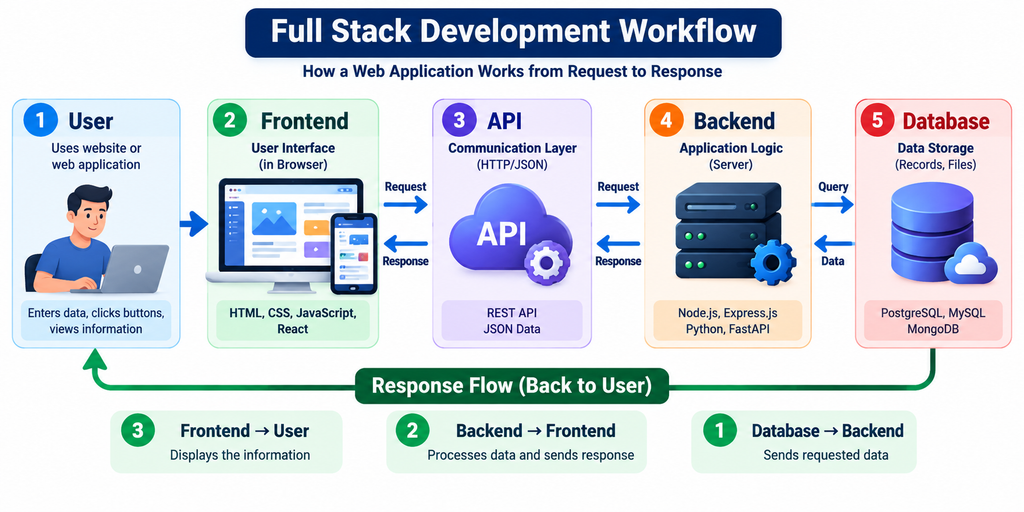
Let us understand each component.
Component 1: User Interface
This is the part of the application that users interact with. It includes the home page, login form, course cards, search bar, dashboard and other visible elements.
Common technologies include HTML, CSS, JavaScript and React.
Component 2: API Layer
The API allows different parts of the application to communicate. The frontend sends a request, and the backend returns the required information or the result of an operation.
Common concepts include HTTP, REST APIs, JSON and request methods such as GET, POST, PUT, PATCH and DELETE.
Component 3: Backend Server
The backend receives requests, validates input, applies business rules, checks permissions and communicates with the database or other services.
Common options include Node.js with Express.js, Python with FastAPI or Django, and Java with Spring Boot.
Component 4: Database
The database stores information that must remain available after a user closes the website.
For an education portal, it may contain student accounts, course details, enrolments, attendance, test results and payment records.
Common database options include PostgreSQL, MySQL and MongoDB.
Component 5: Security
Security includes password hashing, authentication, authorization, input validation, HTTPS and safe management of secret keys.
It helps protect users and prevents unauthorized access to private information.
Component 6: Hosting and Deployment
The application needs a suitable hosting environment to become available online. Deployment makes the code available in that environment, while configuration connects the application to the required services.
Tools and services may include GitHub, cloud hosting, managed databases, domain registration and HTTPS certificates.
Important: This architecture is a general learning model. A real application may include additional services for payments, emails, notifications, file storage, caching and monitoring.
4. Frontend Development: The User Interface
Frontend development focuses on the part of a website that users see and use.
Imagine visiting an education portal. You see a navigation menu, a course search bar, course images, a login button and a student dashboard. These are examples of frontend elements.
HTML: Structure of a Webpage
HTML stands for HyperText Markup Language.
It provides the structure and meaning of webpage content, such as headings, paragraphs, images, links, forms and buttons.
For example, HTML defines where the course title, description and enrolment button appear on a webpage.
CSS: Design and Styling
CSS stands for Cascading Style Sheets.
It controls colours, fonts, spacing, layouts, borders, animations and responsive design.
CSS helps a website look professional and work across different screen sizes, including desktop computers, tablets and mobile phones.
JavaScript: Interactivity
JavaScript adds behaviour to a webpage.
It can validate forms, open menus, filter courses, display messages and request data from a backend API.
For example, when a student searches for a Python course, JavaScript can help send the search request and display matching results.
React: Building Interactive Interfaces
React is a JavaScript library used to build user interfaces through reusable components.
A course card can be developed once and reused to display many different courses. Components can also be used for navigation menus, dashboards, forms and other interface elements.
Frontend Technology Summary
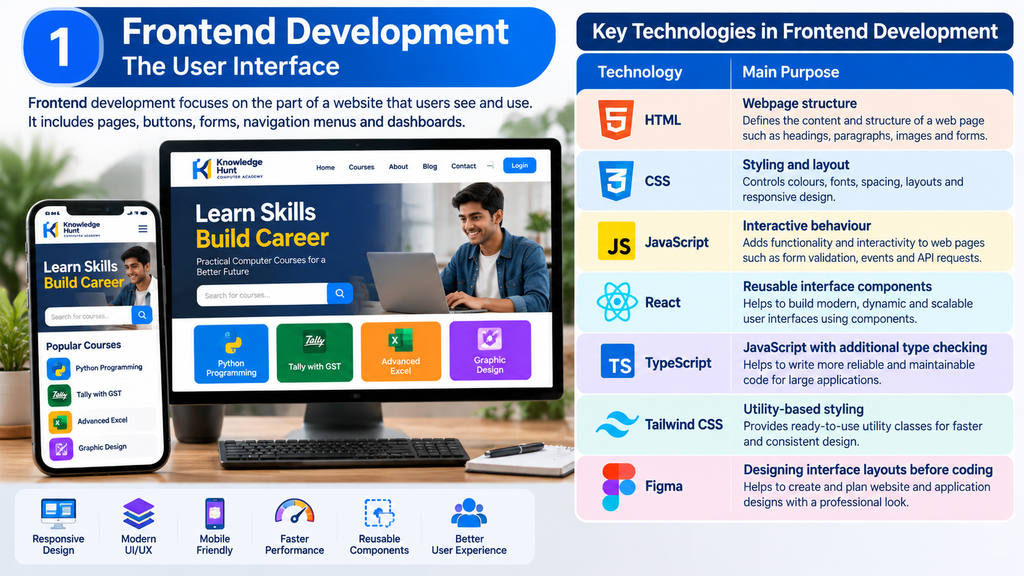
| Technology | Main Purpose |
|---|---|
| HTML | Webpage structure |
| CSS | Styling and layout |
| JavaScript | Interactive behaviour |
| React | Reusable interface components |
| TypeScript | JavaScript with additional type checking |
| Tailwind CSS | Utility-based styling |
| Figma | Designing interface layouts before coding |
Beginners should first understand HTML, CSS and JavaScript. After building a few simple webpages, they can move to React or another frontend framework.
Official Learning Resources
If you want to learn more about frontend development, these official resources will help you:
5. Backend Development: The Brain of an Application
The backend is responsible for processing requests and applying the rules of an application.
Users usually cannot see backend code directly, but many of the actions they perform depend on it.
For example, when a student purchases a course, the backend checks the request, verifies the relevant payment information through the payment provider and updates the enrolment status only after confirming the payment result.
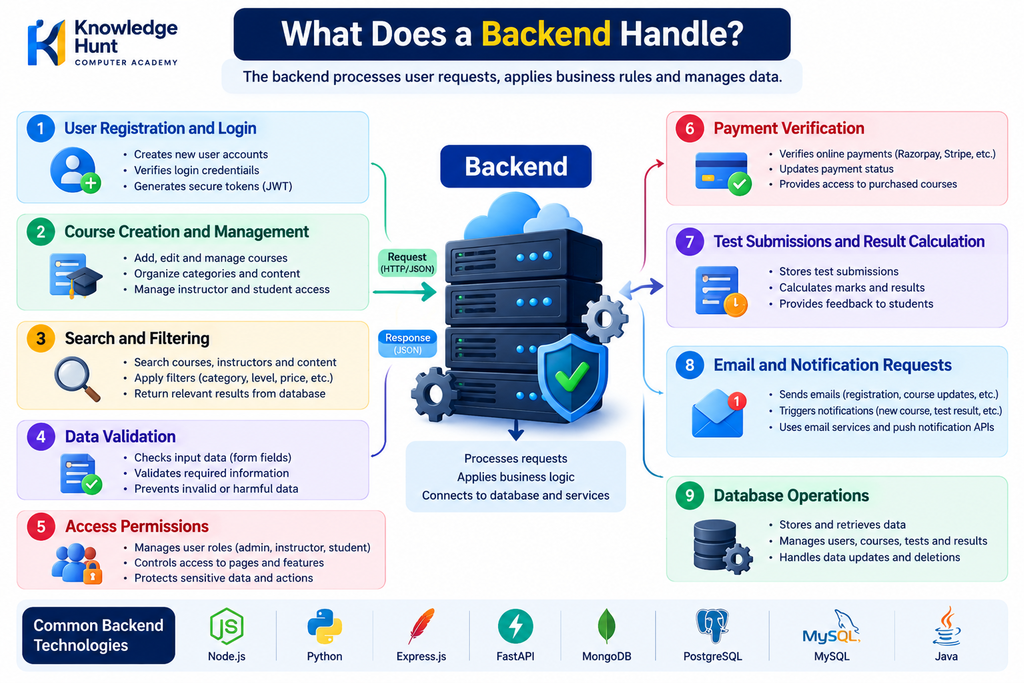
What Does a Backend Handle?
A backend may handle:
- User registration and login.
- Course creation and management.
- Search and filtering.
- Data validation.
- Access permissions.
- Payment verification.
- Test submissions and result calculation.
- Email and notification requests.
- Database operations.
Node.js and Express.js
Node.js allows JavaScript to run outside the browser, including on a server.
Express.js is a web framework commonly used with Node.js to create routes, APIs and backend applications.
This is a practical option for learners who want to use JavaScript for both frontend and backend development.
Python and FastAPI
Python is a general-purpose programming language used in web development, automation, data science and artificial intelligence.
FastAPI is a Python framework for building APIs. It supports request validation, type hints and automatic API documentation.
Django is another Python framework that provides many features for building web applications.
Java and Spring Boot
Java is widely used for enterprise software, business applications and large backend systems.
Spring Boot simplifies the process of developing Java-based applications and APIs.
You do not need to learn Node.js, Python and Java together at the beginning. Choose one backend technology based on your project goals and learn it properly.
6. APIs: Connecting Frontend and Backend
API stands for Application Programming Interface.
In web development, an API provides a defined way for one software component to communicate with another.
Suppose a student opens a course page. The frontend needs the course information, but that information may be stored in a database that the frontend cannot safely access directly.
The frontend sends a request to a backend API. The backend retrieves the permitted information and returns a response.
For example:
GET /api/courses— retrieve a list of courses.GET /api/courses/101— retrieve details of a particular course.POST /api/enrolments— request course enrolment.POST /api/auth/login— submit login credentials for authentication.
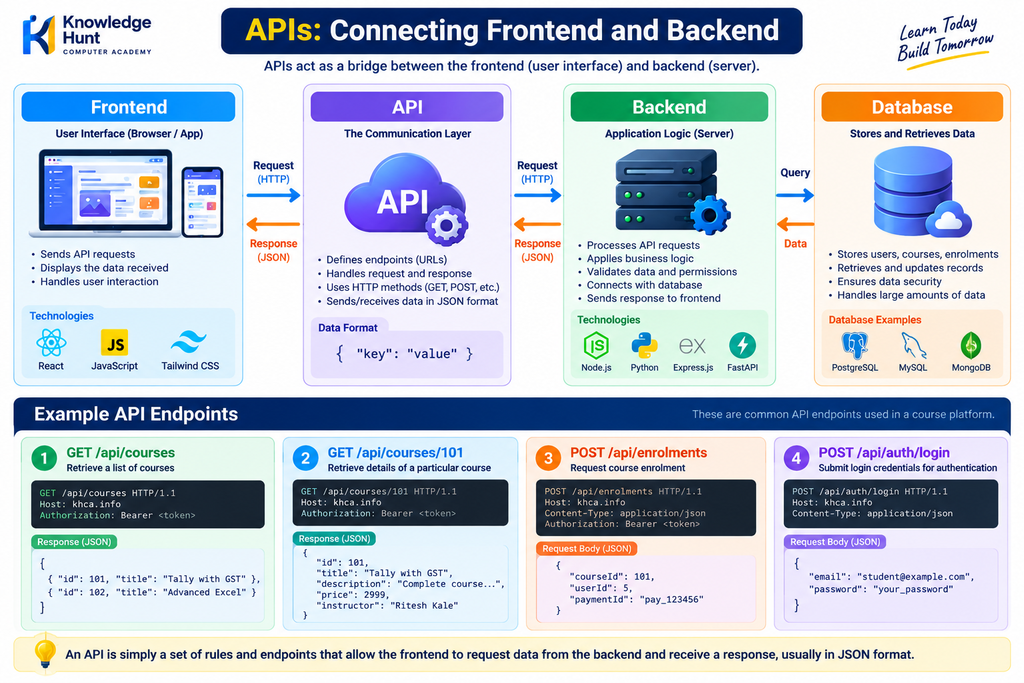
These are illustrative API routes. The actual routes depend on the application’s design.
What Is JSON?
JSON stands for JavaScript Object Notation. It is a common format for exchanging structured information between applications.
For example, a backend may return course information in this format:
{
  "id": 101,
  "title": "Python Programming",
  "duration": "3 Months",
  "level": "Beginner"
}
The frontend can use this response to display the course title, duration and level.
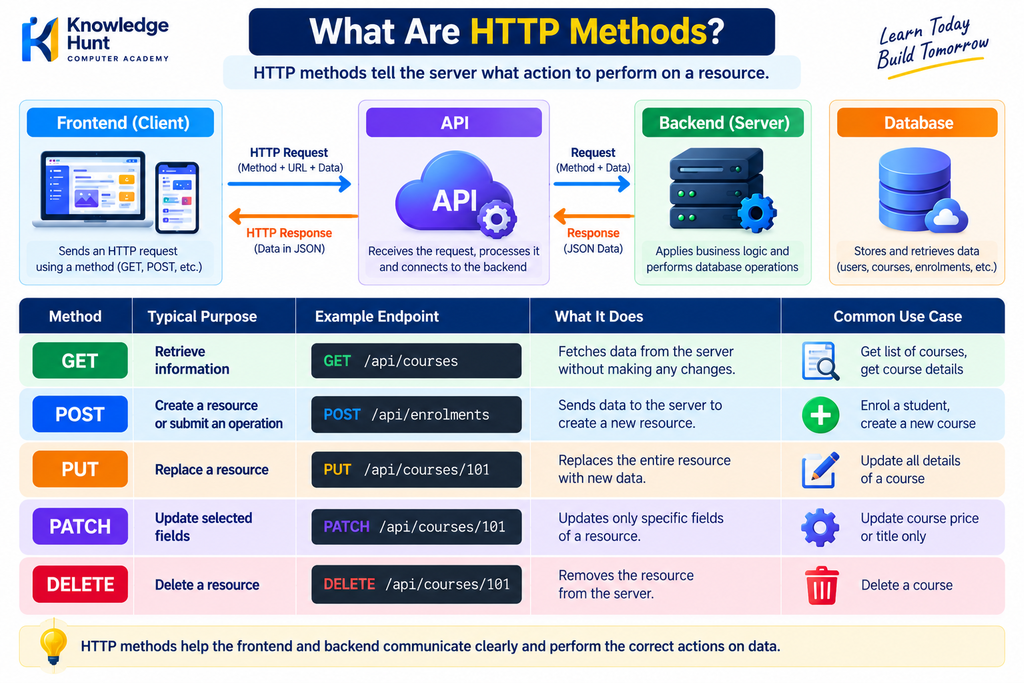
What Are HTTP Methods?
| Method | Typical Purpose |
|---|---|
| GET | Retrieve information |
| POST | Create a resource or submit an operation |
| PUT | Replace a resource |
| PATCH | Update selected fields |
| DELETE | Delete a resource |
An API is not just a connection between two files. It is a defined interface with rules about requests, responses, validation and access permissions.
7. Database: Storing and Managing Information
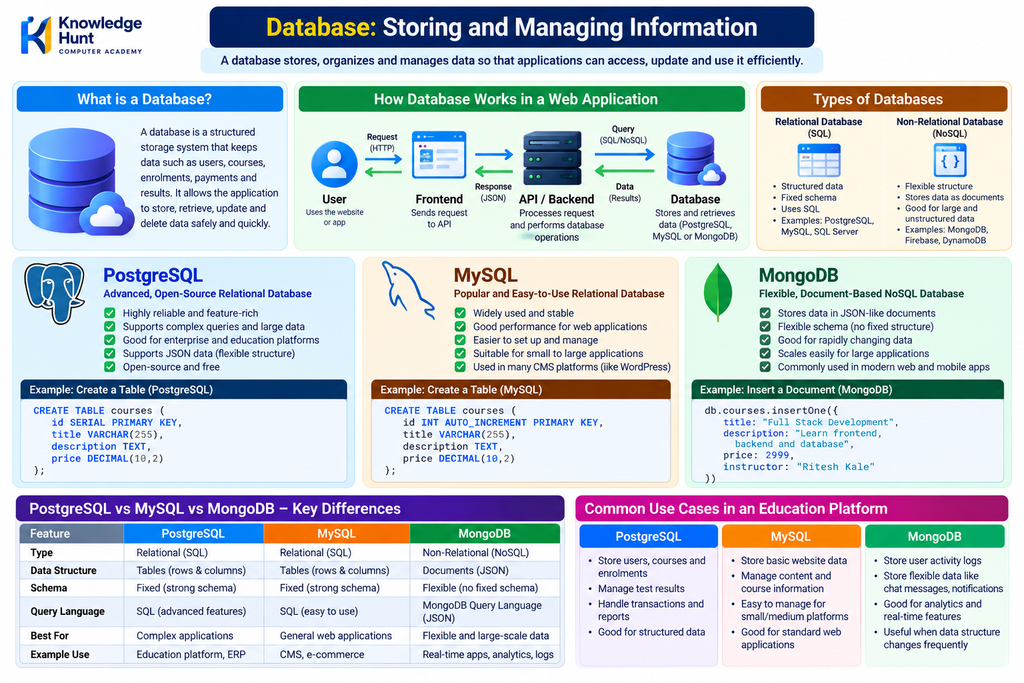
A database stores and organises information so that an application can retrieve, update and manage it efficiently.
Consider an education portal. It may need to store student profiles, course details, teacher information, enrolments, attendance, test results and payment references.
A database helps maintain these records in a structured and reusable way.
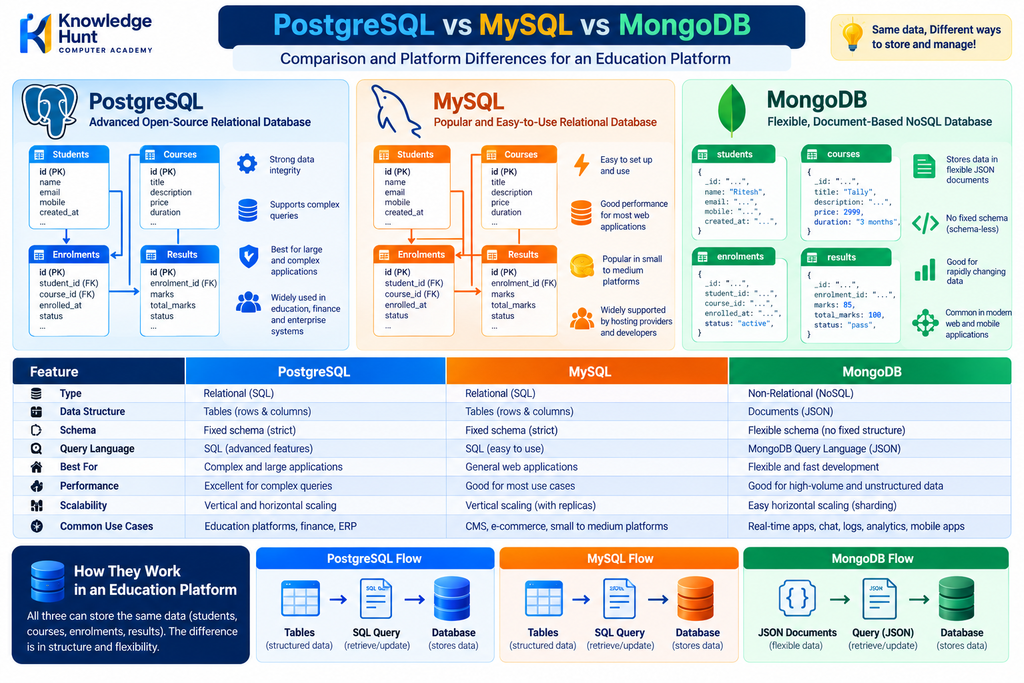
PostgreSQL and MySQL
PostgreSQL and MySQL are relational database management systems.
They organise information into tables with rows and columns. Different tables can be connected using relationships and keys.
For example:
- Students table
- Courses table
- Enrolments table
- Results table
A student may enrol in several courses, and each course may have many students. The database can represent this relationship using linked records.
SQL is used to create tables, retrieve records, update information and perform other database operations.
Example:
SELECT title, duration
FROM courses
WHERE level = 'Beginner';
This query retrieves the title and duration of beginner-level courses from a table named courses.
MongoDB
MongoDB is a NoSQL database that stores information in document-oriented structures.
It can be suitable for applications that work with flexible document data, depending on the design and requirements.
Which Database Should You Learn First?
For a beginner building an education portal or business management system, PostgreSQL is a strong starting option because it teaches relational data modelling, SQL, joins and data integrity.
You can learn MongoDB later to understand a different database model.
The best database depends on the application’s requirements. One database is not automatically better for every project.
8. Authentication and Application Security
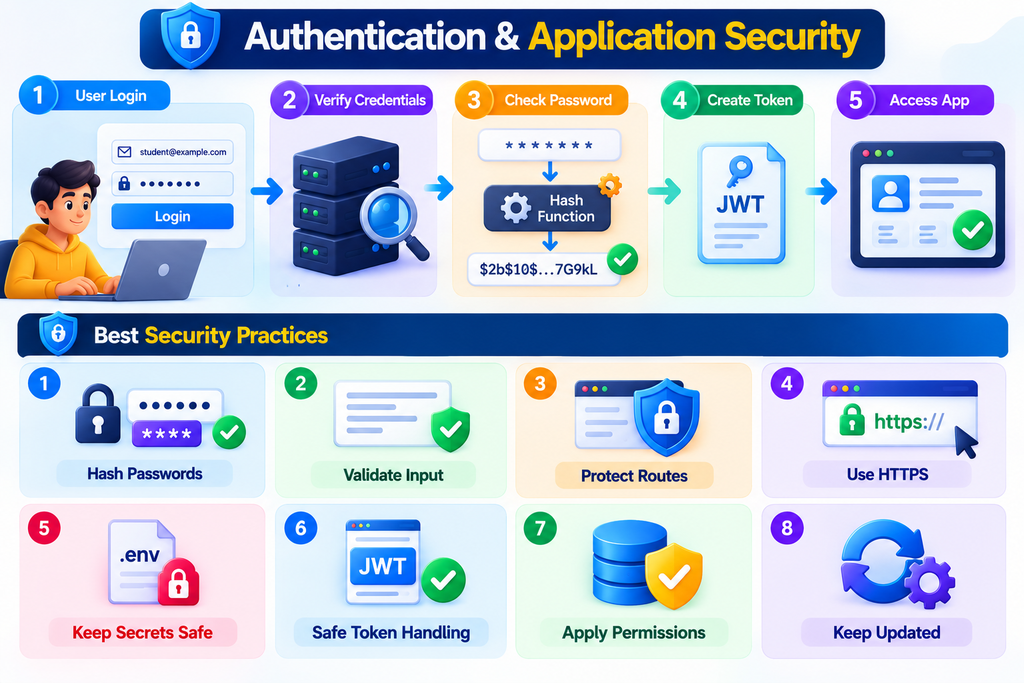
A professional web application must do more than display information. It must also protect accounts and control who can access particular features.
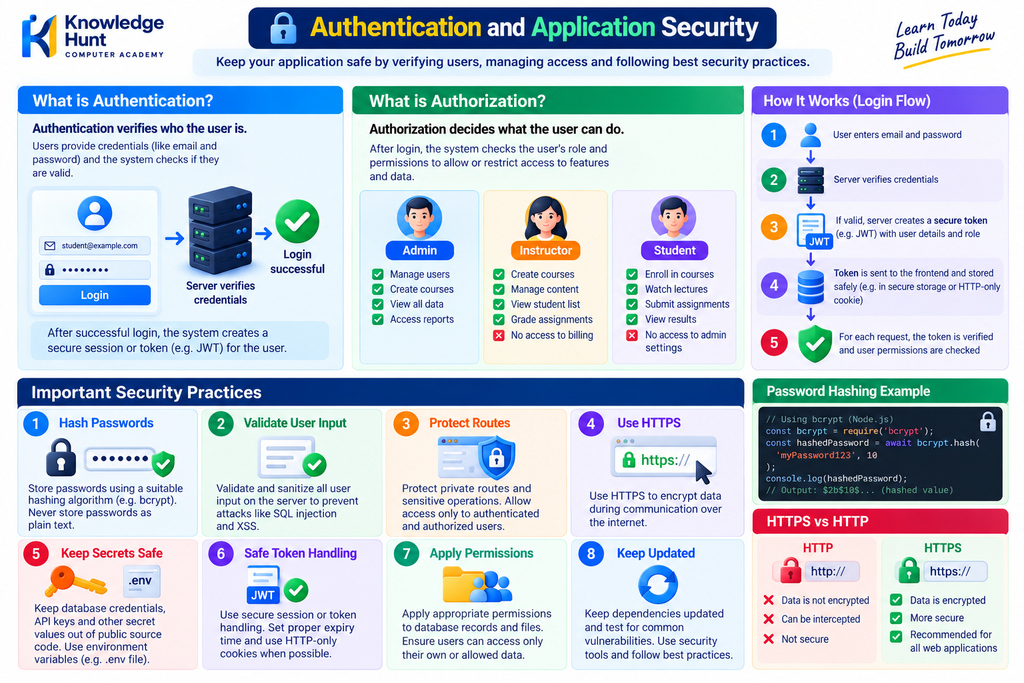
Authentication
Authentication verifies the identity of a user.
For example, a student enters their email and password to log in to an education portal.
The backend verifies the credentials and establishes an authenticated session or issues an appropriate token.
Authorization
Authorization determines what an authenticated user is allowed to do.
For example:
- Students can view their enrolled courses and results.
- Teachers can manage their assigned courses.
- Administrators can manage users and approve course listings.
The backend must enforce these permissions. Hiding a button on the frontend is not sufficient security.
Important Security Practices
A secure application should:
- Store passwords using a suitable password-hashing algorithm, never as plain text.
- Validate user input on the server.
- Protect private routes and sensitive operations.
- Use HTTPS for communication over the internet.
- Keep database credentials, API keys and secret values out of public source code.
- Use safe session or token handling.
- Apply appropriate permissions to database records and files.
- Keep dependencies updated and test for common vulnerabilities.
Security should be considered from the beginning, rather than added only after the website is complete.
9. Development Tools Every Beginner Should Know
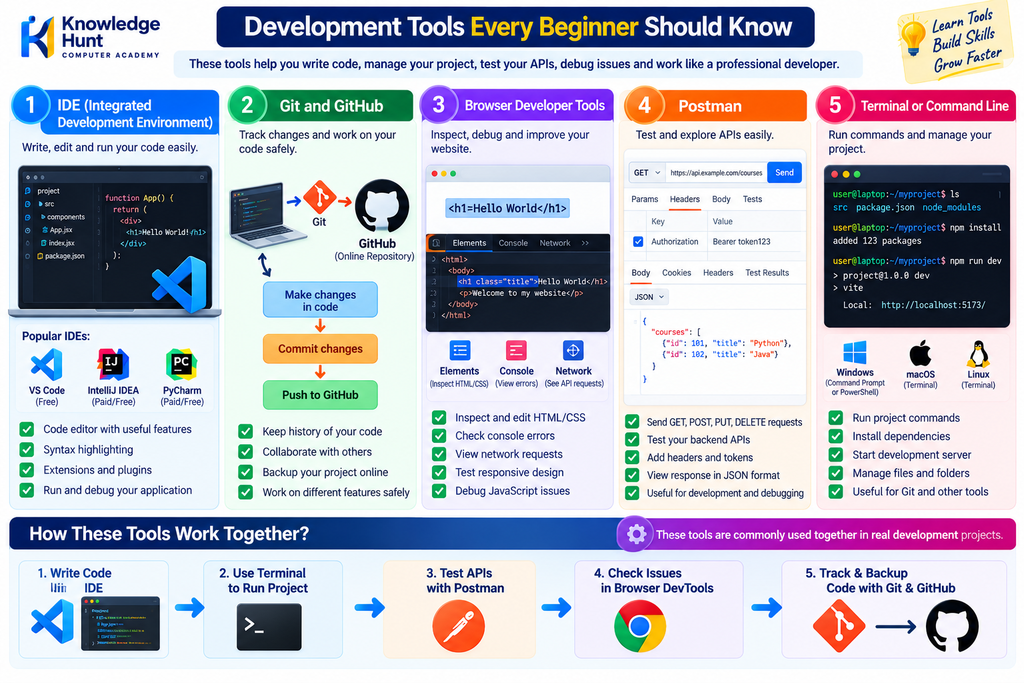
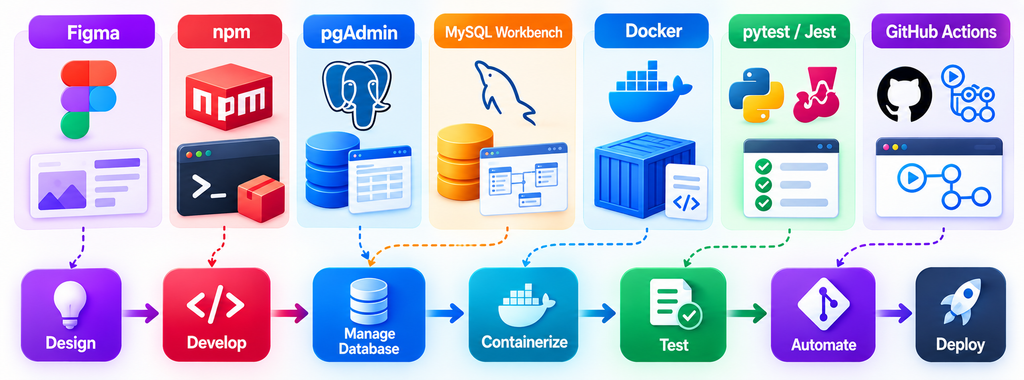
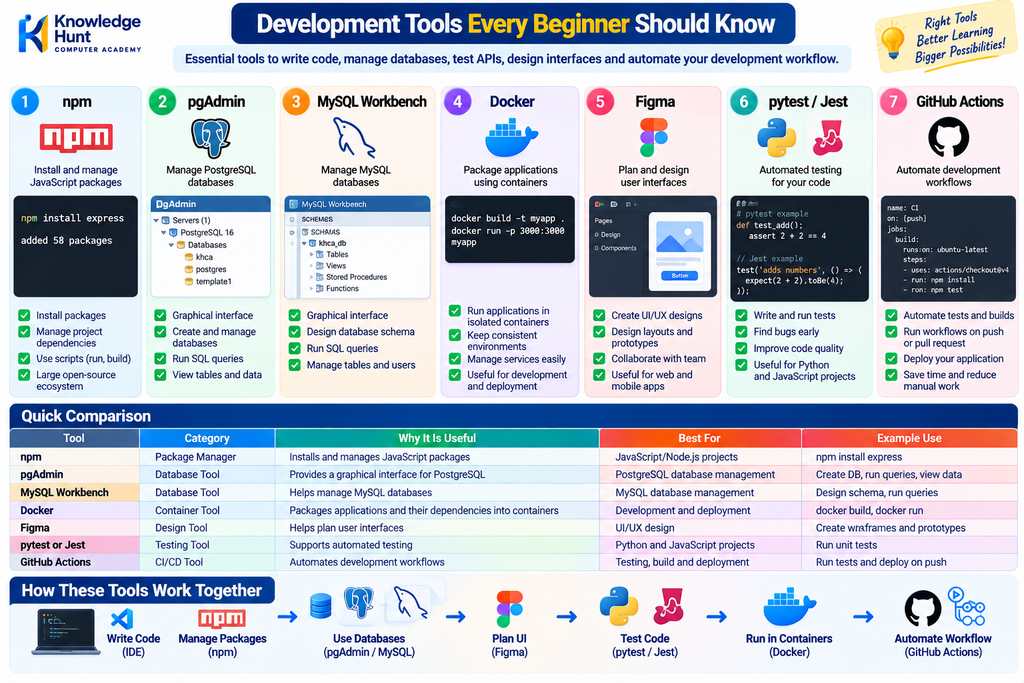
Programming languages help you write code, but development tools help you create, test, manage and publish that code.
Visual Studio Code
Visual Studio Code, commonly called VS Code, is a code editor used for writing and managing project files.
It supports extensions, debugging, terminal access and many programming languages.
Git and GitHub
Git is a version control system. It tracks changes in code and helps developers work with different versions of a project.
GitHub is an online platform used to host Git repositories and collaborate with other developers.
You can use Git and GitHub to maintain your project history, back up code and share your portfolio.
Browser Developer Tools
Modern browsers include developer tools that help you inspect webpage elements, check network requests, view console errors and troubleshoot layout problems.
These tools are particularly useful when a website is not displaying correctly or an API request is failing.
Postman
Postman is a tool for sending requests to APIs and inspecting their responses.
For example, you can test a login API or retrieve course information without first building the complete frontend.
Terminal or Command Line
The terminal lets developers execute commands, install packages, run development servers and manage projects.
Learning basic commands is an important part of becoming comfortable with development.
Additional Tools
| Tool | Why It Is Useful |
|---|---|
| npm | Installs and manages JavaScript packages |
| pgAdmin | Provides a graphical interface for PostgreSQL |
| MySQL Workbench | Helps manage MySQL databases |
| Docker | Packages applications and their dependencies into containers |
| Figma | Helps plan user interfaces |
| pytest or Jest | Supports automated testing |
| GitHub Actions | Automates development workflows |
You do not need to install every tool on the first day. Start with VS Code, a modern browser, Git, and the tools required by your chosen technology stack.
10. Hosting, Domain and Deployment
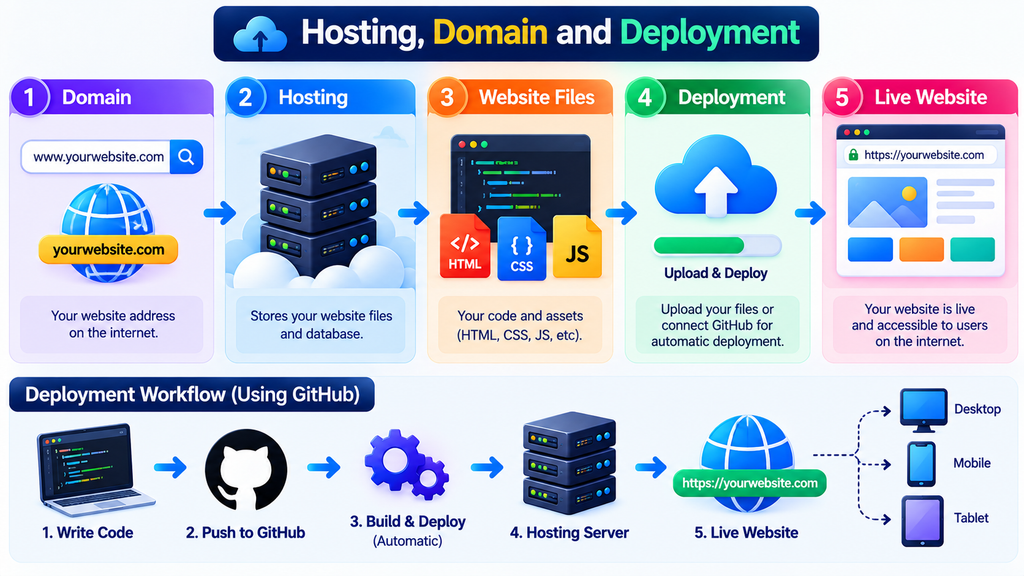
After developing and testing an application on your computer, the next step is to make it available online.
This involves hosting, deployment and configuration.
What Is a Domain Name?
A domain name is the human-readable address of a website, such as example.com.
DNS helps translate a domain name into the relevant network information required to reach the service.
What Is Hosting?
Hosting provides the computing environment where an application or its files are made available.
Depending on the architecture, you may need separate hosting for the frontend, backend and database, or you may use a platform that manages several components.
What Is Deployment?
Deployment is the process of releasing an application into its intended environment.
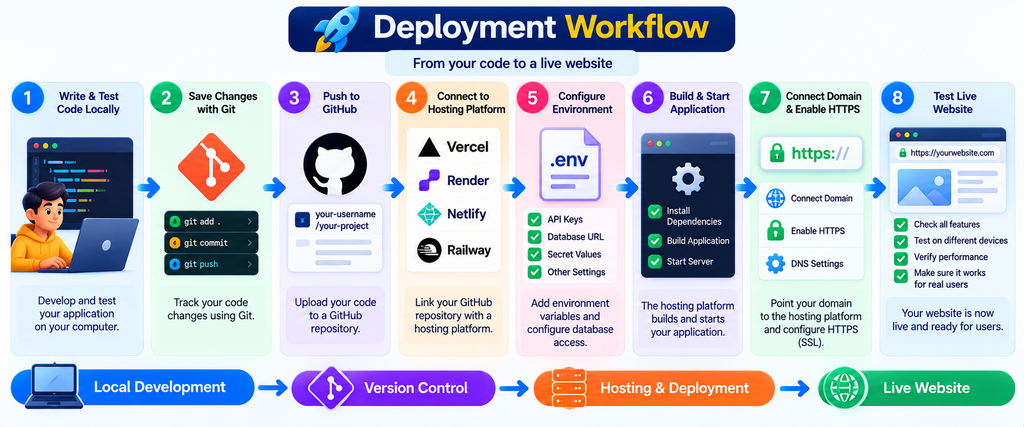
A typical deployment workflow includes:
- Writing and testing code locally.
- Saving changes using Git.
- Pushing the code to a GitHub repository.
- Connecting the repository to a hosting platform.
- Configuring environment variables and database access.
- Building and starting the application.
- Connecting the domain and configuring HTTPS where required.
- Testing the live website.
Common Hosting Options
- Vercel: Commonly used for frontend projects and supported web application frameworks.
- Render: Can host web services, applications and supported managed services.
- AWS: Provides a wide range of cloud computing, storage, database and networking services.
- Other providers: Railway, managed database platforms and suitable cloud hosting services.
Choose a platform based on your application’s requirements, cost, supported runtime and expected traffic. Free plans and their limits can change over time.
11. How All Components Work Together: An Online Education Portal Example
Let us understand the complete system through a practical example.
Suppose Knowledge Hunt wants to build an online education portal where students can register, purchase courses and access learning materials.
Step 1: Student Opens the Website
The student opens the website using a browser.
The frontend displays the homepage, available courses, login button and navigation menu.
Step 2: Student Searches for a Course
The student enters “Python Programming” into the search box.
The frontend sends a request to the backend API. The backend validates the search input, retrieves the permitted matching courses and returns the results.
The frontend displays the course cards.
Step 3: Student Creates an Account
The student fills in the registration form.
The backend validates the information, checks for duplicate accounts and securely stores the required account information.
Step 4: Student Purchases a Course
The student selects a course and proceeds to payment.
The backend creates or initiates a payment through an appropriate payment provider. It verifies the payment result using a trusted server-side confirmation mechanism before granting paid-course access.
The application should not trust a message from the browser alone as proof of successful payment.
Step 5: Student Opens the Course
After successful enrolment, the student opens the course dashboard.
The backend checks the student’s identity, permissions and enrolment status. If access is allowed, it returns the available course content.
Step 6: Student Attempts a Test
The student answers the questions and submits the test.
The backend validates the submission, calculates the result according to the test rules and saves the result in the database.
Step 7: Administrator Manages the Portal
An administrator opens a protected dashboard to manage courses, review records and monitor activity according to their permissions.
This example shows how frontend, backend, API, database, security and hosting work as one connected system.
12. Which Technology Stack Should You Learn?
A technology stack is a group of technologies used together to build and operate an application.
There are several valid full stack development paths. Your choice should depend on the type of application you want to build and the skills you want to develop.
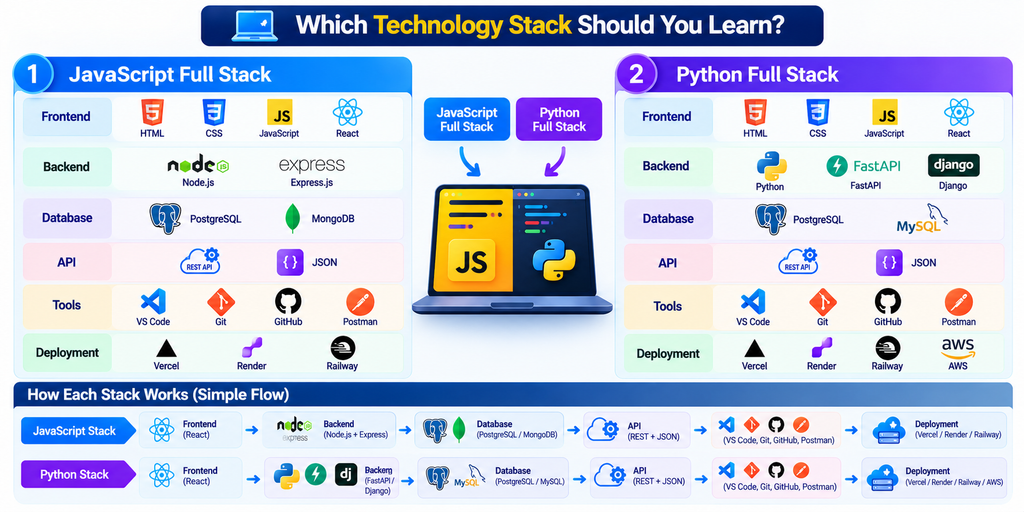
Option 1: JavaScript Full Stack
- Frontend: HTML, CSS, JavaScript and React.
- Backend: Node.js and Express.js.
- Database: PostgreSQL or MongoDB.
- API: REST and JSON.
- Tools: VS Code, Git, GitHub and Postman.
- Deployment: A suitable hosting platform and managed database.
This option is useful for learners who want to use JavaScript across frontend and backend development.
The MERN stack is another popular JavaScript-based combination that uses MongoDB, Express.js, React and Node.js.
Option 2: Python Full Stack
- Frontend: HTML, CSS, JavaScript and React.
- Backend: Python with FastAPI or Django.
- Database: PostgreSQL or MySQL.
- API: REST and JSON.
- Tools: VS Code, Git, GitHub and Postman.
- Deployment: A suitable cloud or application hosting service.
This option can be particularly useful if you also plan to explore Python automation, data science or AI-related applications.
My Recommendation for Beginners
Start with one stack instead of learning multiple backend languages simultaneously.
For a conventional education portal, business management system or course platform, React with Node.js and PostgreSQL is a practical choice. If Python and AI integration are important to your goals, React with FastAPI and PostgreSQL is also a good option.
The objective is not to collect technology names. It is to understand how to build, connect, test, secure and deploy a working application.
13. Step-by-Step Full Stack Development Roadmap
Learning Full Stack Development becomes easier when you follow a proper sequence.
The following roadmap is designed for beginners who want to build practical projects while learning.
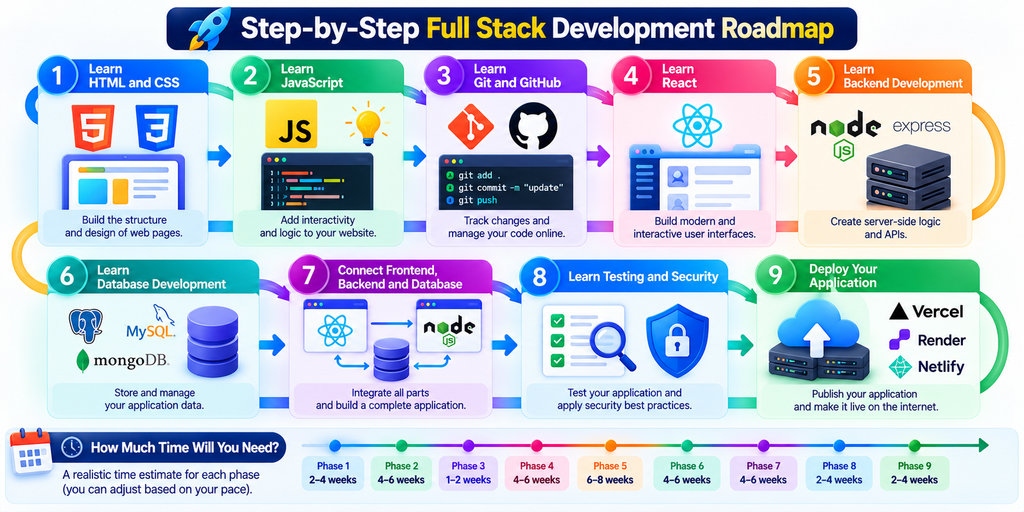
Phase 1: Learn HTML and CSS
Start by learning the structure and design of webpages.
Topics to cover:
- HTML elements and semantic structure.
- Headings, paragraphs, links and images.
- Forms and input fields.
- CSS selectors and styling.
- Flexbox and CSS Grid.
- Responsive design.
- Basic accessibility.
Practice project: Build a personal portfolio website with an About section, Skills section, Projects section and Contact form.
Phase 2: Learn JavaScript
JavaScript adds interactive behaviour to webpages.
Topics to cover:
- Variables and data types.
- Operators and conditions.
- Loops and functions.
- Arrays and objects.
- DOM manipulation and events.
- Promises and async/await.
- Fetching data from APIs.
- Error handling.
Practice project: Build a to-do application with task creation, editing, completion and deletion.
Phase 3: Learn Git and GitHub
Start version control early so that you can manage your projects properly.
Learn how to:
- Create a Git repository.
- Track changes.
- Commit code.
- Create branches.
- Push code to GitHub.
- Work with README files.
- Resolve basic merge conflicts.
Practice task: Upload your portfolio and JavaScript projects to GitHub.
Phase 4: Learn React
After understanding JavaScript fundamentals, learn how to create reusable interfaces using React.
Topics to cover:
- Components and props.
- State and event handling.
- Forms and validation.
- Hooks.
- Routing.
- Fetching API data.
- Loading and error states.
- Basic component organisation.
Practice project: Build a course listing website with search, filters and individual course details.
Phase 5: Learn Backend Development
Choose one backend technology.
For a JavaScript path, learn Node.js and Express.js. For a Python path, learn FastAPI or Django.
Topics to cover:
- How servers work.
- HTTP requests and responses.
- API routes.
- Request validation.
- Error handling.
- Business logic.
- Authentication and authorization.
- Environment variables.
- Secure configuration.
Practice project: Create APIs for student registration, login and course management.
Phase 6: Learn Database Development
Learn how to store and retrieve application data.
Topics to cover:
- Tables, rows and columns.
- Primary and foreign keys.
- SQL queries.
- INSERT, SELECT, UPDATE and DELETE.
- Relationships and joins.
- Constraints and indexes.
- Database design.
- Transactions and data integrity.
Practice project: Create a database for students, courses and enrolments, and connect it to your backend.
Phase 7: Connect Frontend, Backend and Database
This is the stage where your application becomes a complete full stack project.
Learn how to:
- Connect React to backend APIs.
- Send and receive JSON data.
- Handle forms and server responses.
- Display loading and error messages.
- Protect private routes.
- Check permissions on the backend.
- Save and retrieve information from the database.
Practice project: Build a student management system with login, student records, course details and an administrator dashboard.
Phase 8: Learn Testing and Security
Test the application before releasing it.
Learn how to check:
- Form validation.
- API responses.
- Database operations.
- Login and logout.
- Unauthorized access.
- Error handling.
- Password storage.
- Sensitive configuration.
- Common security weaknesses.
Practice task: Test what happens when a user enters invalid information, requests a missing course or tries to access a restricted page.
Phase 9: Deploy Your Application
Publish your completed project online.
Learn how to configure environment variables, connect a hosted database, deploy your code and check application logs.
Test the live application on both desktop and mobile devices.
Practice project: Deploy your student management system and document its features in a GitHub README.
How Much Time Will You Need?
The time depends on your previous knowledge, practice hours and project complexity.
A beginner studying consistently may need around 6–12 months or longer to develop a solid foundation and build meaningful projects. Becoming job-ready also requires debugging experience, problem-solving practice and the ability to explain your code.
Focus on practical ability rather than completing a roadmap as quickly as possible.
14. Practical Projects for Full Stack Development
Projects help you apply concepts and demonstrate what you can build.
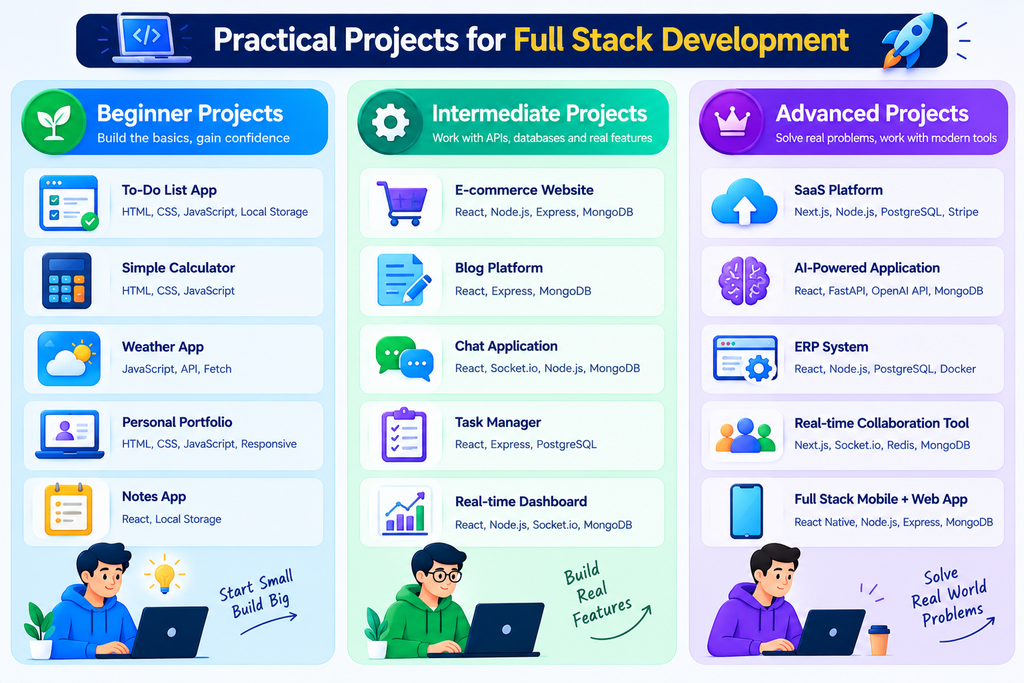
Here are some useful project ideas arranged by difficulty.
Beginner Projects
1. Personal Portfolio Website
Build a responsive website containing your profile, skills, projects and contact information.
2. To-Do List Application
Create a task manager with add, edit, complete and delete features. You can begin with browser storage and later connect it to a backend.
3. Course Listing Website
Display courses with descriptions, categories, search and filters.
Intermediate Projects
4. Student Management System
Create student records, course assignments, search, editing and role-based access.
5. Blog Management System
Build an application where authorised users can create, edit, publish and manage articles.
6. Expense Tracker
Create income and expense records, category filters, monthly summaries and charts.
Advanced Projects
7. Online Learning Management System
Build student and instructor dashboards, course enrolments, lessons, assignments, tests and results.
8. E-Commerce Application
Create product listings, shopping carts, order management and payment integration.
9. Business Management System
Develop customer records, inventory, billing, reports and user permissions.
10. AI-Powered Web Application
Build an application that connects a user interface to a backend AI service. Protect API keys on the server and apply suitable usage limits.
For every project, aim to understand the entire process: planning, design, coding, database structure, API connections, testing, security and deployment.
A smaller, complete and well-documented project is often more useful for learning than a large project with many unfinished features.
15. Common Mistakes to Avoid
Many beginners find Full Stack Development difficult because they try to learn too many technologies at once.
Avoid these common mistakes:
Learning many languages simultaneously: Start with one primary programming language and one backend framework.
Skipping the basics: Learn HTML, CSS, JavaScript, HTTP and database fundamentals before depending heavily on frameworks.
Watching tutorials without building projects: Practise each concept by writing code and solving small problems.
Copying code without understanding it: Be able to explain what your functions, API routes and database queries do.
Ignoring error messages: Learn to use browser developer tools, terminal logs and API testing tools.
Connecting the database directly to the frontend: Use a properly designed backend or server-side layer to protect credentials and enforce permissions.
Ignoring security: Validate input, protect private routes and keep secret values outside public code.
Deploying without testing: Check the application in a production-like environment and verify the live system after deployment.
Trying to master everything: Focus on the technologies needed for your next project and expand your knowledge gradually.
16. Career Opportunities After Learning Full Stack Development
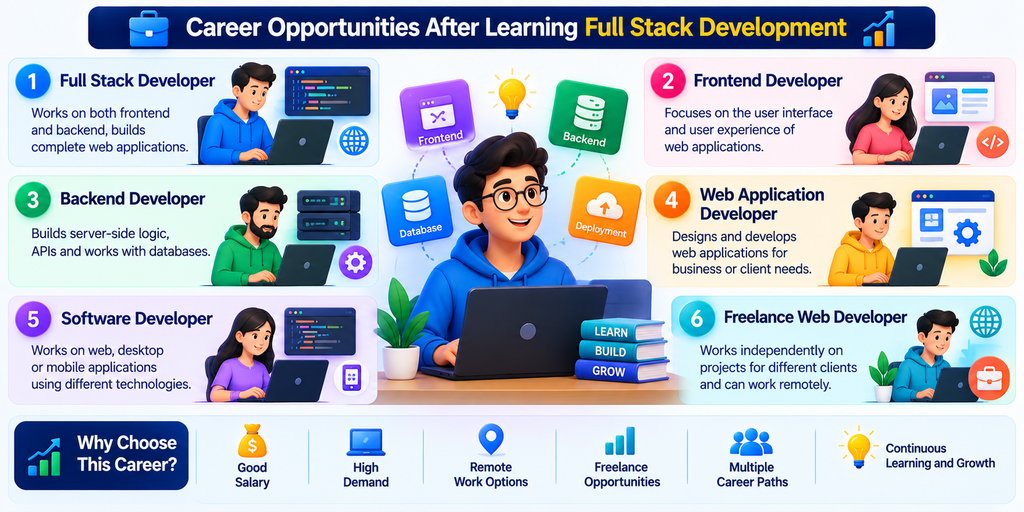
Full Stack Development can prepare you for several types of development roles, depending on your practical skills and experience.
Full Stack Developer
Works across frontend, backend, databases and application integration.
Frontend Developer
Focuses on user interfaces, responsive layouts, accessibility and frontend performance.
Backend Developer
Focuses on APIs, business logic, databases, security and server-side performance.
Web Application Developer
Builds and maintains websites and web applications for businesses and organisations.
Software Developer
Develops software solutions, features and integrations based on business requirements.
Freelance Web Developer
Works with clients to create websites, portals, dashboards and custom web applications.
How Can You Prepare for a Job?
Build two or three complete projects that you can demonstrate and explain.
Maintain a professional GitHub profile, write clear project documentation and practise common programming and problem-solving questions.
Learn how to explain your decisions, identify bugs and describe how frontend, backend and database components communicate.
A course certificate can support your learning, but practical skills and your ability to solve problems are important when applying for development roles. No particular course or roadmap can guarantee a job.
17. Frequently Asked Questions
Q1. What is Full Stack Development in simple words?
Full Stack Development means building the visible part of a website, the backend logic that processes information, and the database and supporting systems that make the application work.
Q2. Can I learn Full Stack Development without a computer science degree?
Yes. You can begin learning with basic computer knowledge, suitable learning resources and regular coding practice. A degree may be required by some employers, but requirements vary by role and company.
Q3. Which language should I learn first?
Start with HTML and CSS to understand webpage structure and design, followed by JavaScript for programming and interactivity. Then choose a frontend framework and one backend technology.
Q4. Is Python useful for Full Stack Development?
Yes. Python can be used for backend development with frameworks such as FastAPI and Django. It is also useful for automation, data analysis and AI-related work.
Q5. Do I need to learn both SQL and MongoDB?
Not at the beginning. Learn one database well, including how to design data structures and perform queries. SQL with PostgreSQL or MySQL is a strong foundation for many business applications. Learn MongoDB when your projects or career goals require it.
Q6. What is the difference between frontend and backend?
Frontend handles the user-facing interface and interactions. Backend processes requests, applies business rules, enforces permissions and works with data and other services.
Q7. Is Full Stack Development difficult?
It can feel challenging because it covers several connected areas. Learning one topic at a time and building small projects makes it more manageable.
Q8. How long does it take to learn Full Stack Development?
The time varies by learner and study schedule. Several months of consistent study can build a foundation, while becoming comfortable with complete applications and job-level problem-solving may take 6–12 months or longer.
Q9. Can I build my own software after learning Full Stack Development?
Yes. You can use your skills to build websites, dashboards, management systems, portals and other web applications. Larger projects may also require support from designers, security specialists or other developers.
Q10. What should I build first?
Start with a portfolio website, then a JavaScript application, a React frontend, a backend API and a database-connected application. Gradually combine these skills into a complete project.
18. Conclusion
Full Stack Development is about understanding how different technologies work together to create a complete web application.
Frontend development creates the interface. Backend development processes requests and manages business logic. APIs connect application components. Databases store information. Security protects users and data. Hosting and deployment make the application available online.
You do not need to learn every technology at once. Start with HTML, CSS and JavaScript, build a few small projects, choose one backend framework and learn how to connect it to a database. Then practise testing, security and deployment.
The most important step is to start building.
At Knowledge Hunt Computer Academy (KHCA), our goal is to help learners understand technology through practical learning, clear explanations and project-based practice.
Whether you want to develop your own website, build business software, explore an IT career or improve your programming skills, learning Full Stack Development can be a valuable step towards your goal.
Start small, practise regularly and keep building.
Learn More with Knowledge Hunt Computer Academy
Explore the learning resources and courses available at Knowledge Hunt Computer Academy.