Are you a student who wants to earn money, gain practical experience and build a career while studying? Freelancing can be one way to explore these opportunities. It allows you to provide services to clients using your skills, often without working as a full-time employee for a single company.
Thank you for reading this post, don't forget to subscribe!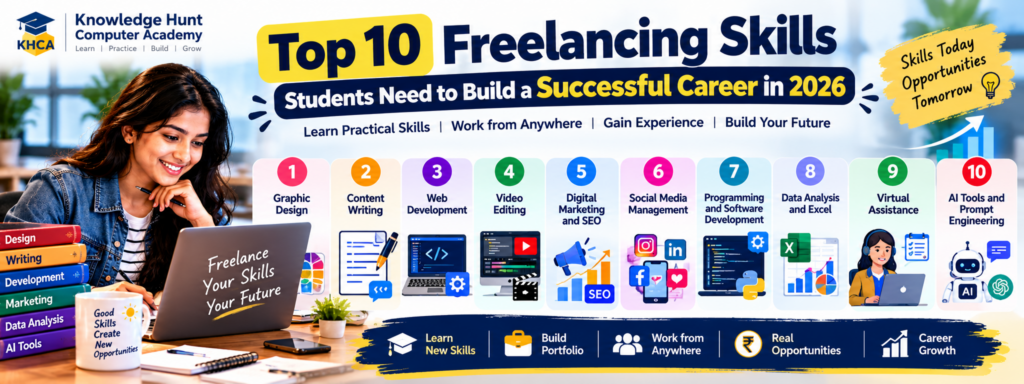
Today, businesses, startups, creators and professionals need help with graphic design, content writing, website development, video editing, digital marketing and many other tasks. Students who learn useful skills and practise them through real projects can prepare themselves to offer these services.
However, freelancing is not a shortcut to earning money. It requires learning, practice, communication, patience and the ability to deliver quality work. Finding clients may take time, especially when you are starting without experience.
In this guide, we will explore the top 10 freelancing skills for students in 2026, the tools you can learn, beginner-friendly project ideas, popular freelancing platforms and practical steps to help you find your first client.
Whether you are studying in Class 11 or 12, pursuing B.Com, BBA, BCA, B.Sc, an engineering degree or another course, this guide will help you understand how to start learning freelancing skills alongside your education.
Table of Contents
What Is Freelancing?
Freelancing means providing services to clients on a project basis or according to an agreed arrangement. Instead of working only as a permanent employee of one organisation, a freelancer may work with different clients.
For example, a small business may hire a freelancer to design a logo. A YouTube creator may need someone to edit videos. An online store may need help writing product descriptions or managing its social media accounts.
The freelancer agrees on the work, deadline, price and delivery requirements with the client. After completing the agreed work, the freelancer receives payment according to the arrangement.
How Does Freelancing Work?
A typical freelancing process looks like this:
Learn a Skill → Practise → Build a Portfolio → Find Clients → Agree on the Work → Deliver the Project → Receive Payment → Improve Your Skills
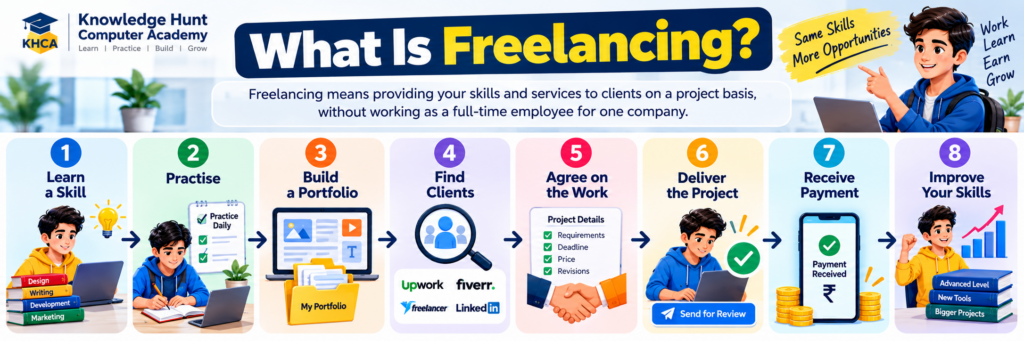
For example, a student who learns graphic design can create sample social media posts. These samples can become part of a portfolio. The student can then approach local businesses or apply for suitable projects on freelancing platforms.
Freelancing does not guarantee regular income. Earnings depend on factors such as skill level, demand, competition, client relationships and the ability to deliver quality work.
Why Should Students Learn Freelancing?
Students can use freelancing to develop practical skills before completing their education. Even if they do not immediately earn money, the experience can help them understand how businesses operate and how professional work is delivered.
1. Gain Practical Experience
Classroom learning gives you knowledge, but practical projects help you apply that knowledge. For example, a student learning Excel can prepare a sales report for a sample business.
2. Develop Communication Skills
Freelancers need to understand client requirements, ask relevant questions, explain their work and respond professionally to feedback.
3. Build a Portfolio
A portfolio shows what you can do. It may include designs, websites, writing samples, edited videos, spreadsheets or other completed projects.
4. Explore Different Career Options
Freelancing can help you understand whether you enjoy design, writing, programming, marketing, data analysis or another field before choosing a long-term career.
5. Learn Time Management
Students must balance education, assignments, examinations and personal responsibilities. Freelancing can teach you to plan tasks and meet deadlines, provided you accept a manageable workload.
Important: Your education should remain a priority. Start with small projects and never accept more work than you can complete alongside your studies.
Top 10 Freelancing Skills for Students in 2026
The following skills cover creative work, technology, business support and AI-assisted services. You do not need to learn all ten. Choose one based on your interests, available resources and the kind of work you want to do.
1. Graphic Design
Graphic design is a useful freelancing skill for students who enjoy creativity, colours, layouts, typography and visual communication.
Businesses need visual content for advertising, websites, social media, presentations, product promotions and branding. Freelance designers help turn ideas into attractive and easy-to-understand visuals.
What can you create?
- Social media posts and promotional banners
- YouTube thumbnails
- Posters and flyers
- Presentation designs
- Business cards and brochures
- Basic logo concepts and brand materials
Tools to learn
- Canva
- Adobe Photoshop
- Adobe Illustrator
- Figma for suitable digital design work
Beginners can start with Canva and gradually explore professional design software based on their goals.
Practical project idea
Create five social media posts for an imaginary computer institute, a restaurant or a local clothing shop. Keep the colours, typography and visual style consistent. Then prepare a promotional poster and a YouTube thumbnail.
Place these designs in a portfolio and explain the purpose of each design.
Who should choose this skill?
Students who enjoy creativity, visual storytelling and designing content may find graphic design a good starting point.
2. Content Writing and Copywriting
Content writing involves preparing useful written material for websites, blogs, educational platforms and businesses. Copywriting focuses more directly on writing that encourages readers to take an action, such as exploring a product or registering for a service.
Businesses need clear content to explain their products, answer customer questions and communicate their ideas.
What services can you offer?
- Blog articles
- Website content
- Product descriptions
- Social media captions
- Email newsletters
- Educational notes
- Advertising copy
Skills to learn
Learn grammar, sentence structure, research, proofreading, paragraph organisation and audience awareness. You should also understand basic SEO, including search intent, headings, keywords and meta descriptions.
AI writing tools can assist with brainstorming and editing, but you must verify facts, improve the writing and follow the client’s originality and disclosure requirements.
Tools to learn
- Google Docs
- Microsoft Word
- Grammarly or similar writing assistants
- Google Trends for exploring topic interest
- WordPress for publishing practice
Practical project idea
Write a 700-word article about a useful topic for students. Add a clear title, headings, examples, a conclusion and reliable sources. Prepare a short meta description and a social media caption for the same article.
Who should choose this skill?
Students who enjoy reading, explaining ideas, researching topics and writing in English or other languages may find content writing suitable.
3. Website Development
Website development involves creating and maintaining websites for individuals, businesses, educational institutes and organisations.
Many small businesses need a website to explain their services, share contact information, display products or collect enquiries.
What can you offer?
- Basic business websites
- Portfolio websites
- Landing pages
- WordPress website setup
- Website content updates
- Basic website maintenance
- Responsive page design
Skills to learn
Start with HTML for page structure, CSS for styling and JavaScript for interactivity. Learn responsive design so websites work properly on mobile phones and computers.
You can also explore WordPress, which allows users to create websites with themes and plugins. For more advanced work, learn Git, website accessibility, basic security and performance optimisation.
Tools to learn
- Visual Studio Code
- HTML, CSS and JavaScript
- WordPress
- Git and GitHub
- Browser developer tools
Practical project idea
Create a responsive website for an imaginary coaching class. Include a home page, course information, about section, contact details and enquiry form.
Test the website on different screen sizes and ensure the links and forms work correctly.
Who should choose this skill?
Students who enjoy computers, logical thinking, problem-solving and building digital products may prefer website development.
4. Video Editing
Video editing is useful for creators, businesses, educators and organisations that publish videos online.
Short videos are commonly used for social media, while longer videos may be needed for YouTube, educational content, product demonstrations and interviews.
What services can you offer?
- Short-form videos and Reels
- YouTube video editing
- Educational video editing
- Subtitles and captions
- Basic transitions and effects
- Audio cleaning
- Product demonstration videos
Skills to learn
Learn trimming, sequencing, transitions, audio levels, subtitles, colour correction and export settings. Good editing is not about using as many effects as possible; it is about making the content clear and engaging.
Tools to learn
- DaVinci Resolve
- CapCut, where available and appropriate
- Adobe Premiere Pro
- Audacity for suitable audio-editing tasks
Choose software that works with your computer and budget. Check current licensing and availability before installing a tool.
Practical project idea
Create a 30-second promotional video for a fictional computer academy. Include a clear opening, three key points, readable captions and a closing call to action.
Use your own footage, properly licensed assets or material you have permission to use.
Who should choose this skill?
Students who enjoy storytelling, visual content, music, video production and social media may enjoy video editing.
5. Digital Marketing and SEO
Digital marketing helps businesses reach potential customers through online channels. Search Engine Optimisation (SEO) focuses on improving a website’s visibility in relevant unpaid search results.
Businesses may hire freelancers to help with website optimisation, keyword research, content planning, reporting and online campaign support.
What services can you offer?
- Keyword research
- On-page SEO
- Blog optimisation
- Website content planning
- Basic competitor research
- Digital campaign reporting
- Email marketing support
Skills to learn
Understand search intent, title tags, meta descriptions, headings, internal links, image alt text and useful content. Learn the basics of analytics and how to measure traffic, engagement and conversions.
For digital marketing, also study audience research, campaign objectives, calls to action and the differences between organic and paid promotion.
Tools to learn
- Google Search Console
- Google Analytics
- Google Trends
- Google Keyword Planner
- Rank Math SEO for WordPress websites
Some tools require website access or account permissions. Never make changes to a client’s website without permission.
Practical project idea
Create an SEO improvement plan for an imaginary coaching institute. Select a topic, prepare a suitable title and meta description, organise the headings, suggest internal links and write descriptive image alt text.
Who should choose this skill?
Students who enjoy research, writing, business growth and understanding customer behaviour may find digital marketing suitable.
6. Social Media Management
Social media management involves helping businesses maintain their online presence and communicate with their audiences.
A small business may need regular posts, captions, a content calendar and help responding to common customer enquiries.
What can you offer?
- Monthly content calendars
- Social media graphics
- Captions and hashtags
- Post scheduling
- Basic audience engagement
- Performance summaries
- Campaign coordination
Skills to learn
Understand the audience, platform requirements, brand voice, content planning and basic analytics. Learn to distinguish between engagement, reach, clicks and conversions.
Social media management also requires professionalism. Follow the client’s approval process and do not publish unapproved offers or claims.
Tools to learn
- Canva
- Meta Business Suite
- Google Sheets
- Platform-native analytics
- Scheduling tools that the client has authorised
Practical project idea
Prepare a seven-day social media content calendar for a local training institute. Create three sample posts, write captions and specify the purpose of each post.
Who should choose this skill?
Students interested in communication, content planning, marketing and online communities may enjoy social media management.
7. Programming and Software Development
Programming is the process of writing instructions that computers can execute. Software developers use programming to create applications, automate tasks and solve technical problems.
This skill can lead to more complex freelance projects, but it usually requires consistent practice and a strong understanding of the technologies involved.
What services might you eventually offer?
- Simple Python automation
- Small web applications
- Website functionality
- Data-processing scripts
- Bug fixing within your ability
- Basic API integrations
- Testing and technical support
Skills to learn
Start with programming fundamentals such as variables, conditions, loops, functions, data structures and error handling.
Then choose a direction. Python may suit automation and data work, while JavaScript is important for web development. Learn Git, debugging and testing as you build more complex projects.
Tools to learn
- Python
- JavaScript
- Visual Studio Code
- Git and GitHub
- Appropriate testing tools
Practical project idea
Build a simple expense tracker that accepts expenses, organises them by category and calculates totals. Document how to use it and test it with sample data.
Who should choose this skill?
Students who enjoy logical reasoning, coding and solving technical problems may prefer programming.
Do not accept projects involving sensitive systems, payments or confidential data unless you have the necessary skills, authorisation and security knowledge.
8. Data Analysis and Excel
Data analysis involves organising information, identifying patterns and communicating useful findings. Excel is a practical starting point because many businesses use spreadsheets for reports, budgets, sales records and daily operations.
Students with a Commerce, Economics, Statistics, Mathematics or Computer Science background may find this skill particularly useful.
What services can you offer?
- Spreadsheet formatting and cleanup
- Data entry and validation
- Sales summaries
- Expense and budget reports
- Excel dashboards
- PivotTable reports
- Basic data visualisation
Skills to learn
Start with Excel formulas, sorting, filtering, conditional formatting and charts. Then learn lookup functions, PivotTables and data validation.
As you progress, explore Power Query, SQL, Python and Power BI. These tools can help you handle larger datasets and create more advanced reports.
Tools to learn
- Microsoft Excel
- Google Sheets
- Power BI
- SQL
- Python and Pandas for more advanced analysis
Practical project idea
Create a sample sales report using fictional data. Include total sales, monthly trends, top-selling products and a chart showing performance.
Explain what the report shows and identify any limitations in the data.
Who should choose this skill?
Students who enjoy numbers, spreadsheets, statistics, business reporting and problem-solving may find data analysis a good option.
Always obtain permission before handling real client data and protect any confidential information.
9. Virtual Assistance
A Virtual Assistant (VA) provides remote administrative or organisational support to a business owner, professional or team.
The work depends on the client’s needs and may include scheduling, document preparation, data organisation and email support.
What services can you offer?
- Spreadsheet and document formatting
- Calendar management
- Online research
- Data organisation
- Presentation preparation
- Meeting notes
- Basic customer support
- Organising digital files
Skills to learn
Develop professional communication, attention to detail, time management, file organisation and spreadsheet skills.
Learn how to prepare documents, organise folders, maintain task lists and follow instructions carefully. Confidentiality is especially important when dealing with client documents.
Tools to learn
- Google Docs and Sheets
- Microsoft Word and Excel
- Google Calendar
- Microsoft Outlook
- Project management tools such as Trello
Practical project idea
Prepare a sample weekly schedule, a meeting agenda, a formatted spreadsheet and a short meeting summary for a fictional business.
These examples can demonstrate your organisational skills without using real confidential information.
Who should choose this skill?
Students who are organised, dependable and comfortable with office software may find virtual assistance a suitable starting point.
10. AI Tools, Prompt Writing and AI Agents
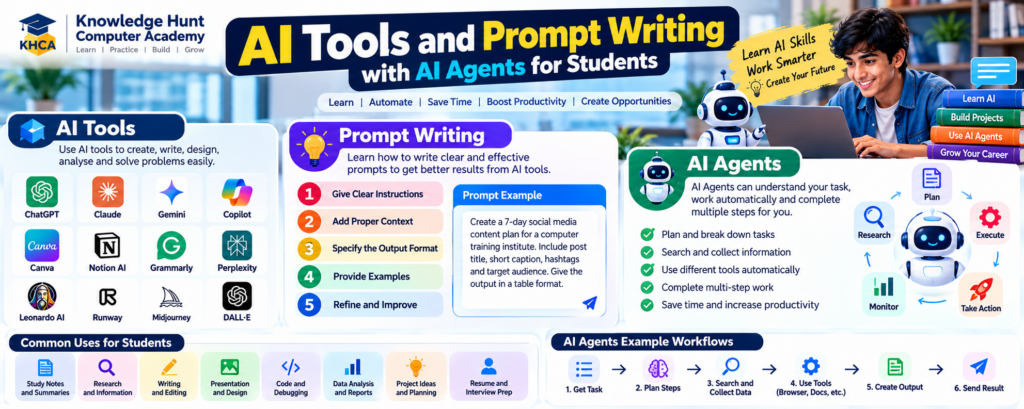
Artificial Intelligence (AI) is creating new opportunities for students, freelancers and businesses. AI tools can help people write content, create designs, analyse information, generate code and complete many everyday tasks more efficiently.
However, using an AI tool and building an AI-powered workflow are not the same thing. To use AI effectively, students should understand three important areas: AI tools, prompt writing and AI agents.
Learning these skills alongside graphic design, content writing, programming, digital marketing or data analysis can help you offer more useful services to clients.
What Are AI Tools?
AI tools are applications that use Artificial Intelligence to help users perform specific tasks. Depending on the tool, they can generate text, summarise documents, create images, assist with programming, analyse information or help organise work.
Examples of AI tools include:
- ChatGPT: Helps with brainstorming, explanations, drafting, coding assistance and problem-solving.
- Google Gemini: Supports research assistance, writing, summarisation and other AI-powered tasks.
- Claude: Can help with writing, analysing documents, coding assistance and organising information.
- Canva AI features: Can assist with design ideas and creating visual content, depending on the available features.
- AI coding assistants: Help developers understand code, explore solutions and identify possible errors.
AI tools can support freelancers in many ways. A content writer can use them to brainstorm article ideas. A designer can explore visual concepts. A programmer can ask for an explanation of an error. A data analyst can use an AI assistant to understand a formula.
Remember that AI-generated information can be incorrect, incomplete or biased. Always review the results before sharing or delivering them to a client.
What Is Prompt Writing?
Prompt writing means giving an AI system clear instructions so that it understands the task you want it to perform. A prompt may include the task, background information, requirements, examples and the expected output format.
A vague prompt often produces a general response. A clear prompt gives the AI better direction, although it does not guarantee an accurate result.
Important elements of a good prompt:
- Task: Explain exactly what you want the AI to do.
- Context: Provide relevant background information.
- Requirements: Mention the audience, tone, length or other restrictions.
- Output format: Specify whether you need a list, table, email, report or another format.
- Review: Check the response and provide further instructions when needed.
Example of a weak prompt:
“Write a social media post.”
Example of a better prompt:
“Write three short social media captions for a computer training institute promoting its beginner Excel course. Use simple Indian English, keep each caption under 50 words, include a clear call to action and avoid unsupported claims.”
The second prompt gives the AI a clear task, audience, language, length and expected result.
What Are AI Agents?
An AI agent is a system that can use an AI model to work towards a defined goal. Depending on its design and permissions, it may plan steps, use tools, retrieve information, perform actions and check results to complete a task.
Unlike a basic chatbot that mainly responds to individual instructions, an AI agent can be designed to carry out a sequence of related actions with less step-by-step guidance from the user.
For example, a simple AI-powered workflow might help a freelancer prepare a content calendar. A more advanced agent could be configured to collect approved topic information, organise ideas, draft a calendar, check the format and prepare a report for review.
Common capabilities of AI agents may include:
- Breaking a goal into smaller tasks
- Searching approved sources or retrieving information
- Using connected tools or APIs
- Processing documents and structured data
- Carrying out multi-step workflows
- Checking whether a task has been completed
- Reporting results or asking for human approval
Not every AI agent can perform all these actions. Its capabilities depend on the model, tools, integrations, access permissions and safeguards configured by its developer.
AI Tools vs Prompt Writing vs AI Agents
These concepts are connected, but each has a different purpose.
| Concept | What it does | Example |
|---|---|---|
| AI Tools | Help users perform tasks using AI features | Using ChatGPT to draft a caption |
| Prompt Writing | Gives the AI clear instructions and context | Asking for three captions in a specific style |
| AI Agents | Can coordinate multiple steps and use permitted tools to work towards a goal | Collecting approved information, drafting a content calendar and preparing it for review |
Prompt writing can improve how you use AI tools. AI agents may also use prompts, instructions, tools and other components to complete more complex workflows.
What Freelancing Services Can You Offer?
AI can support freelance services, but clients generally need a useful result rather than simply access to an AI tool. Combine AI knowledge with a practical skill and deliver work that you can verify.
Depending on your experience, you may offer:
- AI-assisted content writing: Prepare drafts, edit articles and organise content ideas.
- Research organisation: Collect information from suitable sources and prepare structured summaries.
- Document summarisation: Create summaries of documents that you are authorised to access.
- Social media planning: Develop content ideas, captions and content calendars.
- Design assistance: Explore visual concepts and prepare editable designs using suitable tools.
- Coding assistance: Use AI to understand errors, generate test ideas and review code that you can evaluate.
- Spreadsheet support: Get help with formulas and explain or check spreadsheet calculations.
- Workflow automation: Connect approved tools to reduce repetitive tasks.
- AI agent setup: For suitably skilled freelancers, configure simple agents or workflows using authorised integrations and clear safeguards.
Only offer services you can perform reliably. AI-generated output should be checked for accuracy, originality, quality and compliance with client requirements.
Skills You Should Learn
To use AI tools and AI agents effectively, develop the following skills:
1. Prompt Writing
Learn how to define a task, provide context, specify the output and improve a response through feedback.
2. Research and Fact-Checking
Verify important claims using reliable sources. Do not assume that a confident AI response is necessarily correct.
3. Digital Skills
Become comfortable with documents, spreadsheets, presentations, file management and the software relevant to your chosen freelance service.
4. Basic Programming
Python can help with automation, data processing and building AI-powered applications. Beginners do not need to master programming before using basic AI tools, but coding becomes valuable for more advanced workflows.
5. APIs and Integrations
An API allows software systems to communicate. Understanding APIs can help you connect an AI model with other authorised applications and services.
6. Workflow Design
Break a large task into clear steps, define the expected result of each step and decide when a person should review or approve the work.
7. Privacy and Security
Never expose passwords, API keys, confidential documents or personal information unnecessarily. Check the tool’s data-handling terms and obtain permission before processing client information.
8. Testing and Monitoring
Test AI outputs, review actions taken by an agent and check whether the workflow meets the intended goal. Use human approval for sensitive or consequential actions.
Tools to Explore
Beginners can start with familiar AI assistants and gradually explore automation and agent-building tools.
- ChatGPT, Google Gemini and Claude: Explore writing, research assistance, coding help and structured problem-solving.
- Canva: Explore AI-assisted design features where available.
- Python: Learn programming and basic automation.
- APIs: Understand how applications exchange information.
- Workflow automation platforms: Explore tools such as Zapier or Make for connecting supported applications.
- Agent development frameworks: When you have suitable programming foundations, explore frameworks such as LangChain or other current agent-building tools.
Features, pricing, access and terms may change. Check the official documentation before selecting a tool for paid client work.
Practical Project Idea: Build an AI-Assisted Content Workflow
Create a sample workflow for an imaginary computer training institute.
Step 1: Collect the requirements
Define the target audience, topic, preferred language and number of social media posts.
Step 2: Generate content ideas
Use an AI assistant to suggest suitable topics and organise them into categories.
Step 3: Draft captions
Write draft captions with clear instructions about tone, length and purpose.
Step 4: Prepare a content calendar
Organise the topics, captions, planned dates and content types in a spreadsheet.
Step 5: Review the output
Check facts, spelling, repeated ideas, brand consistency and any unsupported claims.
Step 6: Explore agent automation
As a later improvement, build a workflow or agent that can organise the approved inputs, prepare drafts and create a review report. Use only authorised tools and keep a human approval step before publishing anything.
This project helps you understand the difference between asking an AI assistant for a response and designing a workflow that coordinates several tasks.
Who Should Learn AI Tools and AI Agents?
These skills may be useful for students interested in content writing, graphic design, digital marketing, programming, data analysis, business operations and other technology-related fields.
A beginner can start by using AI tools responsibly and practising prompt writing. Once comfortable with the basics, they can explore automation, APIs and AI agents.
You do not need to learn everything at once. Start with one practical problem, build a small solution and test whether it genuinely saves time or improves quality.
Important: AI tools and agents can make mistakes. Agents that have permission to access files, send messages, modify records or use external services can also cause problems if configured incorrectly. Limit permissions, protect sensitive data and require human approval for important actions.
For a stronger freelancing career, combine AI knowledge with a core skill such as writing, design, programming, marketing or data analysis. Your ability to understand client needs, verify results and deliver useful work matters more than simply using the latest AI tool.
Free Tools Students Can Use to Learn Freelancing
You can begin learning many freelancing skills without purchasing expensive software. The right tools depend on the service you want to offer.
| Skill | Tools to explore | Beginner project |
|---|---|---|
| Graphic design | Canva, GIMP | Social media post |
| Content writing | Google Docs, LanguageTool | Blog article |
| Website development | VS Code, WordPress | Portfolio website |
| Video editing | DaVinci Resolve, Audacity | Short promotional video |
| Digital marketing | Google Trends, Search Console | SEO content plan |
| Social media | Canva, Meta Business Suite | Seven-day content calendar |
| Programming | Python, VS Code, GitHub | Expense tracker |
| Data analysis | Excel or Google Sheets, Power BI | Sales dashboard |
| Virtual assistance | Google Docs, Sheets, Calendar | Weekly work schedule |
| AI-assisted work | Available AI assistants | Reviewed content workflow |
Some tools are free, some offer limited free plans and others require payment for particular features. Always check current terms and licensing.
How to Choose the Right Freelancing Skill
Choosing a skill based only on social media trends can lead to frustration. Think about your interests, existing knowledge, available equipment and the type of work you enjoy.
Step 1: Identify Your Interests
Ask yourself what you enjoy doing.
- If you like drawing and visual creativity, explore graphic design.
- If you enjoy writing, explore content writing.
- If you like technology, explore web development or programming.
- If you enjoy videos, explore video editing.
- If you like numbers, explore Excel and data analysis.
- If you enjoy organisation, explore virtual assistance.
Step 2: Check Your Available Resources
Some skills require only a basic computer and internet connection. Video editing and certain development tasks may require more powerful hardware.
Choose a starting point that fits your current resources.
Step 3: Learn One Skill Properly
Avoid learning five unrelated skills at the same time. Select one primary skill and practise it consistently before adding another.
Step 4: Check Real Client Requirements
Read suitable project listings and identify the skills, tools and experience clients request. Use this information to plan your learning.
Do not assume that every skill is equally in demand or pays the same amount.
Step 5: Build Sample Projects
Create two or three strong examples that show your ability. A focused portfolio is more useful than a long list of tools you have only tried once.
How to Build a Freelancing Portfolio Without Experience
One of the biggest challenges for beginners is showing clients what they can do when they have not worked with a paying client before.
The solution is to create practice projects that demonstrate your skills. You do not need to pretend these are paid client projects.
What Should Your Portfolio Include?
1. A Short Introduction
Explain who you are, which service you offer and the type of work you want to do.
2. Two or Three Relevant Projects
Choose examples that match the services you want to provide. For example, a graphic designer could show social media posts, while a data analyst could show a spreadsheet report.
3. A Short Project Explanation
Describe the problem, your approach, tools used and final result. Be honest about whether the work is a practice project or a real client project.
4. Contact Information
Provide a professional email address or another suitable contact method. Avoid sharing personal information that is unnecessary for your work.
5. Clear Presentation
Check spelling, layout, links and file permissions. Make sure potential clients can view your samples without requesting unnecessary access.
You can build a portfolio website, use GitHub for suitable code projects, or prepare a well-organised PDF for visual and written work.
Popular Freelancing Platforms for Beginners
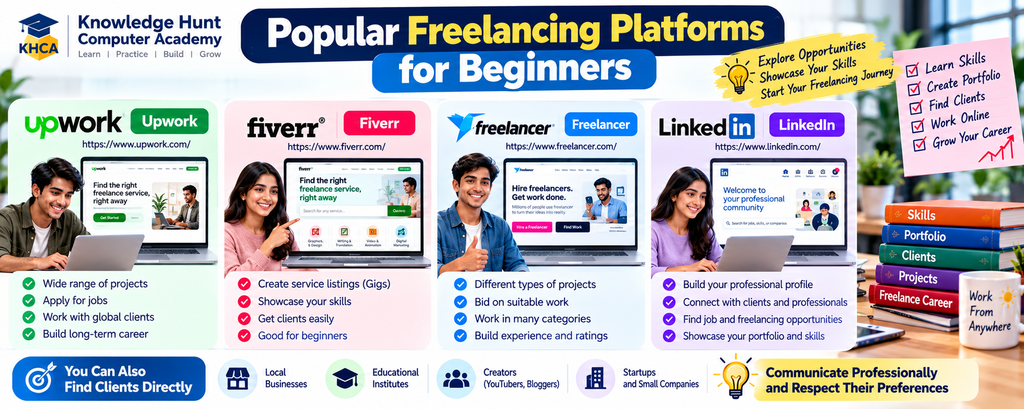
Freelancing platforms can help you discover projects, but joining a platform does not guarantee clients or income. Each platform has its own rules, eligibility requirements, fees and payment arrangements.
Some established platforms to explore include:
Upwork — https://www.upwork.com/
A platform where clients post projects and freelancers apply for suitable opportunities across different service categories.
Fiverr — https://www.fiverr.com/
A platform where freelancers can present services through listings known as Gigs. Clear descriptions and relevant samples help potential clients understand the service offered.
Freelancer — https://www.freelancer.com/
A platform that supports different types of project-based work. Read the project requirements and platform rules carefully before bidding.
LinkedIn — https://www.linkedin.com/
A professional networking platform where you can showcase your skills, connect with professionals and discover work opportunities.
You can also approach local businesses, educational institutes, creators and startups directly, provided you communicate professionally and respect their preferences.
Important Points Before Joining
- Check age and eligibility requirements.
- Read the platform’s fee and payment policies.
- Use an accurate profile and genuine portfolio samples.
- Never pay someone who promises guaranteed clients or jobs.
- Keep communication and payments within platform rules where applicable.
- Avoid sharing passwords, one-time passwords or unnecessary identity documents.
Students who are under the minimum required age must follow the relevant platform’s rules and applicable laws. Do not create an account using false personal details.
How to Find Your First Freelancing Client
Finding the first client can take time. Focus on showing your ability, communicating clearly and building trust rather than sending the same message to hundreds of people.
1. Select a Specific Service
Instead of saying, “I can do all computer work,” describe a clear service, such as designing five social media posts or preparing an Excel sales report.
2. Identify Suitable Clients
Look for businesses or individuals who may genuinely need your service. A local shop may need promotional designs, while a creator may need video editing.
3. Prepare a Relevant Sample
Show a sample related to the client’s type of work. Do not copy their existing material or use their logo without permission.
4. Write a Personalised Message
Explain what service you offer, why it may be useful and where the client can view your portfolio. Keep the message short and professional.
5. Agree on the Work Before Starting
Discuss the scope, deadline, price, number of revisions, delivery format and payment method. Put the agreement in writing.
For larger projects, consider an appropriate deposit or platform-supported milestone arrangement. Do not begin substantial work based only on vague promises.
6. Deliver Quality Work
Follow the agreed requirements, communicate about delays and review your work before delivery.
7. Request Feedback
After completing a project, ask the client for honest feedback. Use the feedback to improve your process and portfolio, subject to the client’s permission and any confidentiality agreement.
Example of a Professional Client Message
Hello,
I am a student learning graphic design and creating social media content for small businesses. I have prepared sample designs that demonstrate my style and approach.
If you need social media posts or promotional graphics, I would be happy to discuss your requirements and share relevant samples.
Thank you for your time.
[Your Name]
Personalise the message for each recipient. Avoid sending repeated unsolicited messages or making promises you cannot fulfil.
Common Freelancing Mistakes Students Should Avoid
1. Learning Too Many Skills at Once
Trying to master everything can prevent you from becoming competent in any one service. Start with one primary skill and build from there.
2. Expecting Immediate Income
Freelancing income is uncertain, especially at the beginning. Focus first on learning, portfolio quality and understanding client needs.
3. Accepting Work Beyond Your Ability
Do not accept projects that require skills you do not have. Be honest about your experience and ask questions before agreeing to a task.
4. Ignoring Communication
Even technically good work can fail when requirements, deadlines or expectations are unclear. Confirm the details and keep the client informed.
5. Working Without Clear Terms
Agree on the scope, price, deadline, revision limits and payment arrangements before starting. Avoid unclear agreements.
6. Copying Other People’s Work
Use your own work or assets that you have permission to use. Follow copyright rules and the terms of any software, stock assets or templates you use.
7. Falling for Freelancing Scams
Be cautious of guaranteed-income schemes, fake job offers, suspicious payment links and requests to pay registration fees to receive promised work.
Never share passwords or OTPs. Verify the identity of a client or platform before providing sensitive information.
8. Neglecting Education
Your studies, examinations and well-being matter. Accept a workload you can manage and avoid working so late that it affects your health or academic performance.
A Simple 30-Day Freelancing Learning Plan
This plan gives beginners a practical starting point. It is designed to help you choose a skill, practise it and prepare initial portfolio samples. It does not guarantee that you will get a client within 30 days.
Days 1–7: Choose and Learn
- Choose one primary freelancing skill.
- Identify the tools you need.
- Follow beginner tutorials or official learning resources.
- Practise the basic techniques.
- Review examples of good-quality work in your chosen field.
Target: Understand the fundamentals and complete a few small exercises.
Days 8–14: Practise with Small Tasks
- Complete one simple practice project.
- Review your mistakes.
- Improve your speed and accuracy.
- Learn basic professional communication.
- Ask a teacher, mentor or trusted person for feedback where possible.
Target: Complete one project that demonstrates your basic ability.
Days 15–21: Build Your Portfolio
- Create two or three relevant samples.
- Organise the files neatly.
- Write a short explanation for each project.
- Check the quality of your work.
- Prepare a simple professional introduction.
Target: Have a small portfolio that you can share with potential clients.
Days 22–30: Prepare to Find Clients
- Research relevant clients and platforms.
- Check eligibility and platform policies.
- Create a professional profile where permitted.
- Prepare personalised client messages.
- Apply only for suitable opportunities.
- Review your progress and improve your samples.
Target: Be ready to approach appropriate clients with a clear service and portfolio.
After the first month, continue practising, reviewing feedback and improving your work. Progress will vary according to your starting level and the time available.
Frequently Asked Questions
1. Which freelancing skill is best for students in 2026?
There is no single best skill for every student. Graphic design, content writing, web development, video editing, digital marketing, programming and data analysis are possible choices. Select a skill that matches your interests, available resources and the requirements of potential clients.
2. Can students start freelancing without experience?
Yes, students can prepare practice projects and a portfolio before applying for suitable opportunities. Be honest about your experience and start with work you can complete reliably.
3. Can I learn freelancing for free?
You can learn many fundamentals using free tutorials, documentation and software. Some advanced courses, tools and services require payment, so check the current terms before enrolling or purchasing anything.
4. How much can a student earn from freelancing?
There is no fixed or guaranteed income. Earnings depend on the service, skill level, project scope, competition, client demand, location and ability to find work. Beginners may take time to secure their first paid project.
5. How many hours should a student spend on freelancing?
Start with a manageable schedule that does not interfere with your education. Even a short, regular practice session can help you improve. Adjust your workload around examinations and assignments.
6. Do I need a certificate to start freelancing?
A certificate may show that you completed a course, but it is not always required. For many services, relevant practical samples, communication and the ability to deliver the agreed work are important.
7. Which freelancing platform is best for beginners?
The right platform depends on your service, eligibility, location and preferences. Research Upwork, Fiverr, Freelancer and LinkedIn, and compare their current rules, fees and payment policies before deciding.
8. Is AI a useful freelancing skill?
AI tools can help with research, drafting, design concepts, coding assistance and workflow planning. However, clients still need accurate, original and well-reviewed work. Combining AI knowledge with a practical skill is generally more useful than relying only on prompts.
9. Can Commerce students do freelancing?
Yes. Commerce students can explore Excel reporting, data analysis, bookkeeping support within their competence, content writing, digital marketing, virtual assistance and other services. They should follow applicable rules and avoid providing regulated professional services beyond their qualifications.
10. How can I avoid freelancing scams?
Research the client or platform, agree on the work and payment terms in writing, avoid suspicious upfront fees and never share passwords or OTPs. Use secure payment arrangements and follow the platform’s rules when working through a marketplace.
Conclusion
Freelancing can help students develop practical skills, gain experience and explore different career opportunities while studying. However, success requires patience, consistent practice, professional communication and a willingness to improve.
Start by choosing one of the top 10 freelancing skills for students that matches your interests. Learn the fundamentals, practise with small projects and create a portfolio that shows what you can actually do.
Next, research potential clients, understand their requirements and offer a clear service. Set realistic expectations, agree on project terms and deliver work responsibly. Do not expect guaranteed income or believe every online promise about quick earnings.
Remember that you do not need to master every skill to begin. One well-developed skill, supported by a good portfolio and reliable communication, can provide a stronger starting point than a long list of incomplete courses.
Keep your education a priority, protect your personal information and continue learning as technology and client needs change.
At Knowledge Hunt Computer Academy (KHCA), students can explore computer training and practical learning opportunities that support their digital skills and career development. Choose a relevant course, practise what you learn and gradually build the skills needed for your future.
Useful Learning Resources
- Canva Design School: https://www.canva.com/designschool/
- WordPress Learn: https://learn.wordpress.org/
- freeCodeCamp: https://www.freecodecamp.org/
- Google Search Central SEO Guide: https://developers.google.com/search/docs/fundamentals/seo-starter-guide
- Python Beginner’s Guide: https://www.python.org/about/gettingstarted/
- Microsoft Excel Help: https://support.microsoft.com/excel
- GitHub Skills: https://skills.github.com/
- Upwork: https://www.upwork.com/
- Fiverr: https://www.fiverr.com/
- Freelancer: https://www.freelancer.com/
- LinkedIn: https://www.linkedin.com/