Table of Contents
Introduction
Have you ever wondered why companies ask candidates about computer knowledge during job interviews?
Thank you for reading this post, don't forget to subscribe!Whether you apply for an Office Assistant, Accountant, HR Assistant, Data Entry Operator, or MIS Executive position, you may find one common requirement: Knowledge of MS Office, especially MS Excel and MS Word.
Today, almost every business uses computers to manage its daily activities. Companies prepare reports, maintain employee records, calculate salaries, manage customer information, create presentations, and communicate through emails.
These activities require practical computer skills.
This is where MS Office Skills become important.
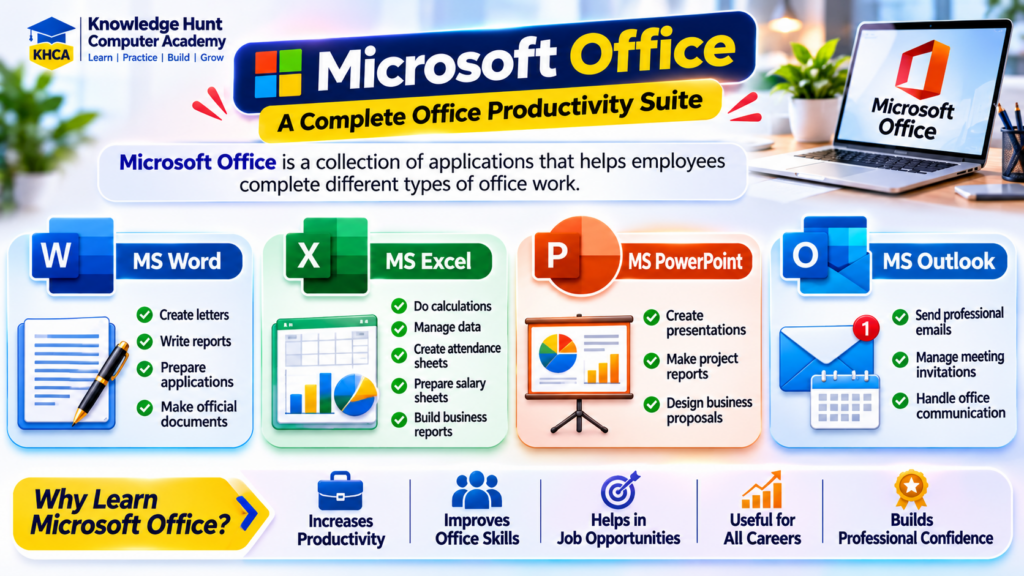
Microsoft Office is a collection of applications that helps employees complete different types of office work. Its commonly used applications include:
- MS Word: For creating letters, reports, applications, and official documents.
- MS Excel: For calculations, data management, attendance, salary sheets, and business reports.
- MS PowerPoint: For creating presentations, project reports, and business proposals.
- MS Outlook: For professional emails, meeting invitations, and office communication.
But here is something important: learning MS Office is not only about learning how to open an application or type something in a document.
The real value comes when you can use these applications to solve actual workplace problems.
For example, an HR employee can use Excel to maintain 100 employee records. An accountant can prepare financial reports. A sales executive can compare monthly sales. An office assistant can prepare professional letters and manage documents.
In this article, we will understand why MS Office is important, where these skills are used, which career opportunities they support, and what practical tasks you should learn to become more confident in office work.
1. Why Are MS Office Skills Important in Today’s Job Market?
Let’s understand this with a simple example.
Imagine two candidates apply for an Office Assistant position.
Both candidates have completed their graduation.
The first candidate knows basic computer operations but does not know how to prepare an Excel report or format an official document.
The second candidate can prepare letters in Word, maintain records in Excel, create reports, and send professional emails.
Which candidate will be more comfortable handling daily office responsibilities?
Obviously, the second candidate has an advantage because they can perform practical tasks required in the workplace.
This is one of the main reasons why MS Office knowledge is useful for freshers and experienced employees.
What Does the Job Market Say?
Digital skills are becoming an important part of workplace requirements.
According to the Employment Outlook Report 2026 findings reported by India Today on 24 September 2026, 58% of employers identified digital literacy as a priority competency during their workforce expansion plans for the second half of FY27.
This tells us that employers value candidates who can work confidently with digital tools.
You can read more in the Employment Outlook Report coverage by India Today.
Are Companies Actually Asking for MS Office Skills?
Yes. Let’s look at some practical job requirement examples.
A sample of 39 accountant job postings from 15 companies in India, analysed for July to September 2026, found that Excel was mentioned by 62% of the companies in that sample.
Similarly, an Office Assistant job listing in Mumbai mentioned good knowledge of MS Excel, MS Word, email, internet applications, and documentation as required skills.
A MIS Executive job listing also mentioned Advanced Excel, Pivot Tables, VLOOKUP, XLOOKUP, and reporting skills.
These are examples of actual recruitment requirements, not a guarantee that every company asks for the same skills.
The important point is that employers do not simply want candidates who know computer theory. They want people who can complete practical work.
2. Where Are MS Office Skills Used in Real Life?
One common question students ask is:
“Where will I actually use MS Office after learning it?”
The answer is simple: MS Office is useful in many different industries and departments.
Let’s understand some common examples.
A. Corporate Offices
Employees working in corporate offices regularly prepare reports, maintain records, send emails, and create presentations.
For example:
- Preparing daily work reports in Excel.
- Creating business letters in Word.
- Preparing meeting presentations in PowerPoint.
- Sending official emails through Outlook.
B. Banks and Financial Organisations
Banking and finance-related departments work with customer records, financial information, calculations, and reports.
MS Excel is useful for maintaining data, preparing calculations, and analysing financial information.
C. Schools and Colleges
Educational institutions use MS Office for managing student information and preparing academic documents.
For example:
- Student attendance records.
- Examination result sheets.
- Fee collection reports.
- Certificates and letters.
- PowerPoint presentations for meetings.
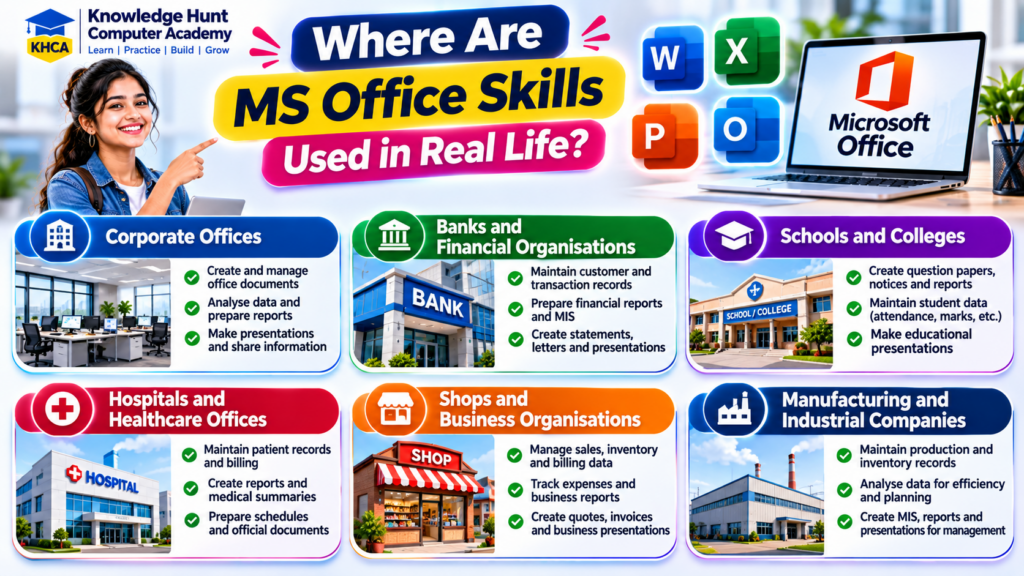
D. Hospitals and Healthcare Offices
Administrative departments in hospitals use computer applications to manage records and reports.
Examples include:
- Patient information records.
- Staff attendance.
- Appointment schedules.
- Monthly reports.
- Office documentation.
E. Shops and Business Organisations
Small and large businesses use Excel and Word for everyday activities.
For example:
- Stock management.
- Sales records.
- Purchase records.
- Customer information.
- Invoice preparation.
- Daily expense reports.
F. Manufacturing and Industrial Companies
Factories and manufacturing companies maintain production, inventory, employee, and quality-related records.
Excel is useful for preparing production reports, tracking stock, and comparing daily or monthly performance.
This means MS Office is not limited to one particular industry. Its applications are useful wherever organisations need to create documents, manage information, and prepare reports.
3. Career Opportunities After Learning MS Office Skills
Now let’s discuss something that is especially important for students and job seekers.
Which jobs can benefit from MS Office knowledge?
MS Office skills can support candidates applying for different entry-level and administrative positions.
Here are some common career options.
1. Office Assistant
<escape> </escape>
Main Responsibilities:
- Preparing official letters.
- Maintaining office records.
- Creating documents in Word.
- Managing Excel sheets.
- Sending and receiving emails.
Important Skills: MS Word, MS Excel, Outlook, typing, and basic computer operations.
2. Data Entry Operator
Main Responsibilities:
- Entering information into computer systems.
- Maintaining customer and employee records.
- Updating spreadsheets.
- Checking data for mistakes.
- Preparing basic reports.
Important Skills: Excel, data entry, typing speed, accuracy, and file management.
3. Accounts Assistant
Main Responsibilities:
- Maintaining daily financial records.
- Preparing expense sheets.
- Managing invoices.
- Calculating totals.
- Preparing basic financial reports.
Important Skills: Excel, basic accounting, TallyPrime, and financial calculations.
4. HR Assistant
Main Responsibilities:
- Maintaining employee information.
- Preparing attendance reports.
- Managing leave records.
- Preparing salary-related data.
- Maintaining employee documents.
Important Skills: Excel, Word, email communication, and documentation.
5. MIS Executive
MIS stands for Management Information System.
An MIS Executive collects information from different departments and prepares reports that help managers understand business performance.
Main Responsibilities:
- Preparing daily, weekly, and monthly reports.
- Maintaining large datasets.
- Using Excel formulas.
- Creating Pivot Tables.
- Preparing dashboards.
- Analysing business information.
Important Skills: Advanced Excel, Pivot Tables, VLOOKUP, XLOOKUP, data analysis, and Power BI.
6. Sales Coordinator
Main Responsibilities:
- Maintaining customer records.
- Preparing sales reports.
- Tracking orders.
- Updating product information.
- Coordinating with the sales team.
Important Skills: Excel, Word, PowerPoint, and email communication.
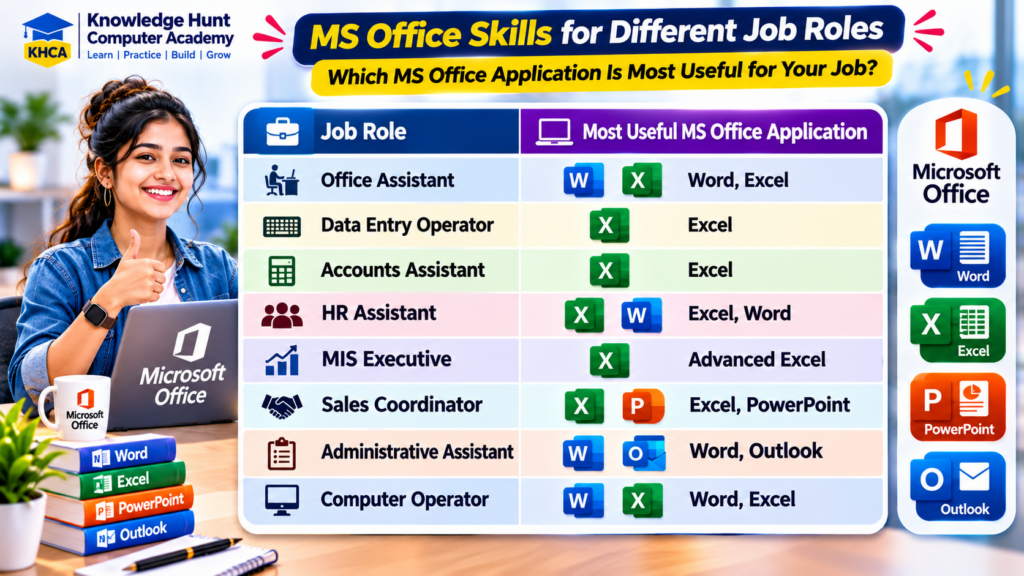
Career Opportunities at a Glance
| Job Role | Most Useful MS Office Application |
|---|---|
| Office Assistant | Word, Excel |
| Data Entry Operator | Excel |
| Accounts Assistant | Excel |
| HR Assistant | Excel, Word |
| MIS Executive | Advanced Excel |
| Sales Coordinator | Excel, PowerPoint |
| Administrative Assistant | Word, Outlook |
| Computer Operator | Word, Excel |
Important: MS Office alone does not guarantee a job. Your educational qualification, communication skills, practical experience, typing accuracy, and other job-specific knowledge also matter.
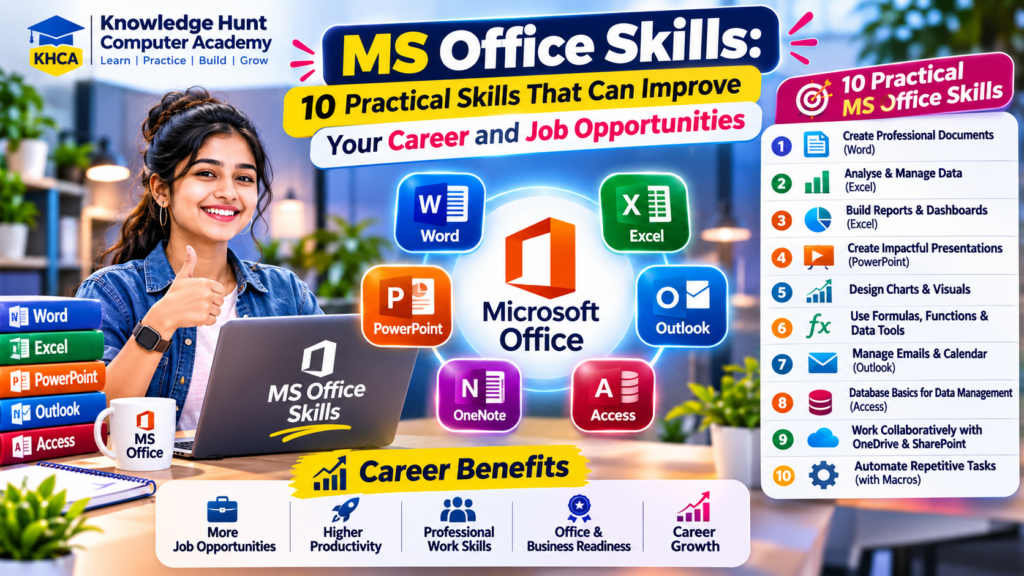
4. What Are the 10 Most Important Practical MS Office Skills to Learn?
Now that we understand the importance of MS Office, let’s look at the practical skills you should learn.
These are not just software features. They are activities that employees perform in real offices.
Skill 1: Creating Professional Documents Using MS Word
Every office needs documents.
Companies prepare letters, applications, reports, notices, agreements, and many other official documents.
Learning MS Word helps you create these documents in a clean and professional format.
What should you learn?
- Creating and saving documents.
- Font formatting.
- Paragraph alignment.
- Inserting tables and pictures.
- Page margins and orientation.
- Header and Footer.
- Page numbering.
- Creating professional reports.
Practical Office Example:
Suppose your manager asks you to prepare an appointment letter for a new employee.
You should know how to create the document, arrange the employee details, format the content, add the company logo, and save the final file as PDF.
This is a real task where MS Word knowledge is useful.
Career Use: Office Assistant, HR Assistant, Administrative Assistant, Computer Operator.
Skill 2: Creating and Managing Excel Worksheets
MS Excel is one of the most useful applications for office employees.
It helps you organise information in rows and columns and perform calculations automatically.
Instead of maintaining hundreds of records manually, you can use Excel to manage the information in one place.
What should you learn?
- Workbook and Worksheet.
- Rows, Columns, and Cells.
- Data Entry and Formatting.
- Basic Mathematical Operations.
- AutoFill.
- Find and Replace.
- Creating Tables.
- Sorting and Filtering.
Practical Office Example:
Suppose you work in a school office and need to maintain the details of 500 students.
You can create an Excel sheet containing:
| Student Name | Class | Mobile Number | Fees |
|---|---|---|---|
| Rahul | 10th | 9876543210 | ₹5,000 |
| Priya | 10th | 9876543211 | ₹6,000 |
You can maintain all student records in one worksheet and quickly search for the required information.
Career Use: Data Entry Operator, Office Assistant, School Administrator, Computer Operator.
Skill 3: Using Excel Formulas for Calculations
One of the biggest advantages of Excel is that it can perform calculations automatically.
Imagine you have to calculate the total salary of 50 employees.
Doing it manually will take time. But using Excel formulas, you can complete the calculation quickly.
Important Formulas to Learn:
| Formula | Purpose |
|---|---|
| SUM | Adds numbers |
| AVERAGE | Calculates average |
| COUNT | Counts numerical cells |
| COUNTA | Counts non-empty cells |
| COUNTIF | Counts cells matching a condition |
| IF | Performs logical calculations |
| MAX | Finds the highest value |
| MIN | Finds the lowest value |
Practical Example:
Suppose an employee has:
- Basic Salary: ₹15,000
- HRA: ₹3,000
- Other Allowances: ₹2,000
To calculate the gross salary, use:
=SUM(B2:D2)
Result: ₹20,000.
You can then subtract deductions to calculate the final salary.
Career Use: Accounts Assistant, HR Assistant, MIS Executive, Payroll Assistant, Office Administrator.
Skill 4: Preparing Attendance and Salary Reports
Many organisations need to maintain employee attendance and salary records every month.
Excel makes this process easier.
What should you learn?
- Preparing attendance sheets.
- Using COUNTIF.
- Calculating present and absent days.
- Maintaining leave records.
- Preparing salary sheets.
- Using mathematical formulas.
- Applying Conditional Formatting.
Practical Example:
Suppose a company has 25 employees.
The HR department needs to calculate the attendance of every employee for the month.
You can use:
=COUNTIF(C2:AG2,"P")
This formula counts the number of days marked as Present.
You can use similar formulas to count Absent and Leave days.
Once the attendance sheet is ready, you can use the data for further salary calculations according to company policy.
Career Use: HR Assistant, Payroll Assistant, Office Administrator, School Administrator.
Skill 5: Managing Data Using Sort, Filter and Remove Duplicates
When working with large datasets, finding the required information can become difficult.
Excel provides tools that help you manage this data easily.
What should you learn?
- Sort A to Z.
- Sort Smallest to Largest.
- Filter by Department.
- Filter by Date.
- Remove Duplicates.
- Find and Replace.
- Freeze Panes.
Practical Example:
Suppose you have a list of 1,000 customers.
Your manager asks you to find only customers from Maharashtra.
You can apply a Filter to the State column and select Maharashtra.
Excel will display only the matching records.
Similarly, you can sort employee salaries from highest to lowest.
Career Use: Data Entry Operator, MIS Executive, Sales Coordinator, Inventory Assistant.
Skill 6: Creating Charts and Business Reports
Companies do not always want to see large tables full of numbers.
Managers often need simple reports that explain business performance.
Charts make this information easier to understand.
What should you learn?
- Column Chart.
- Bar Chart.
- Pie Chart.
- Line Chart.
- Chart Formatting.
- Data Labels.
- Report Preparation.
Practical Example:
A company wants to compare sales for four months.
| Month | Sales |
|---|---|
| January | ₹20,000 |
| February | ₹30,000 |
| March | ₹25,000 |
| April | ₹40,000 |
Using Excel, you can create a Column Chart to show which month had the highest sales.
This helps managers understand business performance without checking every number manually.
Career Use: MIS Executive, Sales Executive, Accounts Assistant, Business Support Executive.
Skill 7: Creating Professional Presentations Using PowerPoint
PowerPoint helps employees explain ideas and information through slides.
Companies use presentations during meetings, training sessions, project discussions, and client meetings.
What should you learn?
- Creating Slides.
- Slide Layouts.
- Design Themes.
- Inserting Images.
- Adding Tables.
- Creating Charts.
- SmartArt.
- Slide Transitions.
- Slide Show.
Practical Example:
Suppose your company wants to present its annual performance to management.
You can prepare a presentation containing:
- Company Introduction.
- Annual Sales Performance.
- Product-wise Sales.
- Achievements.
- Future Business Plans.
You can use charts, images, and short points to explain the information clearly.
Career Use: Sales Coordinator, Office Executive, Business Development Executive, Administrative Assistant.
Skill 8: Writing Professional Emails Using Outlook
Professional communication is an important part of office work.
Employees regularly communicate with managers, customers, suppliers, and colleagues through email.
What should you learn?
- Composing Emails.
- Reply and Forward.
- CC and BCC.
- Adding Attachments.
- Writing Email Subjects.
- Creating Email Signatures.
- Managing Meetings.
Practical Example:
Your manager asks you to send a monthly report to a customer.
You prepare the report in Excel and attach it to an email.
Your email should contain a clear subject, a polite message, and the correct attachment.
For example:
Subject: Monthly Sales Report – October 2026
Dear Sir,
Please find attached the monthly sales report for October 2026.
Kindly review the report and let me know if any changes are required.
Thank you.
Regards,
Rahul Sharma
Career Use: Office Assistant, HR Assistant, Customer Support Executive, Sales Coordinator.
Skill 9: Creating Professional Reports and Documents
A professional report should be properly arranged and easy to read.
Companies use reports to share information about business performance, projects, employees, and daily activities.
What should you learn?
- Page Formatting.
- Heading Styles.
- Header and Footer.
- Page Numbers.
- Tables.
- Automatic Table of Contents.
- Page Breaks.
- Print Settings.
Practical Example:
Suppose you are working as an Office Executive.
Your manager asks you to prepare a monthly activity report.
You can create a Word document with:
- Report Title.
- Introduction.
- Activities Completed.
- Monthly Performance.
- Problems and Solutions.
- Conclusion.
This makes the report organised and professional.
Career Use: Administrative Assistant, Office Executive, Project Assistant, Computer Operator.
Skill 10: Converting and Sharing Documents as PDF
Sharing documents is a regular activity in every organisation.
However, when you share a Word or Excel file, its formatting may look different on another computer because of software versions, fonts, or settings.
PDF is useful when you want to share a document while preserving its layout.
What should you learn?
- Save As.
- Export to PDF.
- Print Preview.
- Page Setup.
- File Naming.
- File Sharing.
- Organising Office Folders.
Practical Example:
Suppose you have prepared a quotation for a customer in MS Word.
Before sending it, you can export it as a PDF and attach it to an email.
The customer can open and read the quotation easily.
Career Use: Office Assistant, Accounts Assistant, Sales Coordinator, Administrative Assistant.
5. Which MS Office Skills Should You Learn for Different Career Goals?
Every job does not require the same level of computer knowledge.
For example, an Office Assistant may need good knowledge of Word and basic Excel. But an MIS Executive may require advanced Excel and reporting skills.
So, it is better to select your learning path according to your career goal.
| Career Goal | Skills You Should Focus On |
|---|---|
| Office Assistant | Word, Excel, Outlook |
| Data Entry Operator | Excel, Data Entry, Typing |
| Accounts Assistant | Excel, Accounting, TallyPrime |
| HR Assistant | Excel, Word, Documentation |
| MIS Executive | Advanced Excel, Pivot Tables, Power BI |
| Sales Coordinator | Excel, PowerPoint, Outlook |
| Administrative Assistant | Word, Excel, Email |
| Business Owner | Excel, Word, Reports, Presentations |
Want to Build a Career in MIS or Data Analysis?
If you are interested in working with business data, do not stop after learning basic Excel.
You can gradually learn:
- Basic Excel.
- Advanced Excel.
- Pivot Tables and Data Analysis.
- Power BI.
- SQL and Database Basics.
These additional skills can help you prepare for more specialised reporting and data-related roles.
Similarly, students interested in accounting can learn Basic Accounting, TallyPrime, GST, and Advanced Excel.
The important thing is to build skills step by step according to your career interest.
6. How to Learn MS Office from Basic to Practical Level
Many students know how to open Word or Excel, but they are not confident when someone gives them an actual office task.
The reason is simple: they have learned features, but they have not practised enough real-world activities.
The best way to learn MS Office is through practical assignments.
Here is a suggested learning roadmap.
Step 1: Learn Basic Computer Operations
Before starting MS Office, understand:
- Using a Keyboard and Mouse.
- Managing Files and Folders.
- Copy, Cut and Paste.
- Installing and Opening Applications.
- Saving and Finding Documents.
Step 2: Learn MS Word
Start with basic document creation.
Practise:
- Creating Letters.
- Preparing Applications.
- Formatting Documents.
- Creating Tables.
- Preparing Reports.
- Exporting Documents as PDF.
Step 3: Learn MS Excel
Start with worksheets and gradually move towards formulas and data management.
Practise:
- Data Entry.
- Formatting.
- Basic Formulas.
- SUM and AVERAGE.
- IF and COUNTIF.
- Sort and Filter.
- Attendance Sheets.
- Salary Sheets.
- Charts and Reports.
Step 4: Learn PowerPoint
Practise creating presentations for different situations.
For example:
- Company Introduction.
- Product Presentation.
- Monthly Sales Report.
- Project Presentation.
Step 5: Learn Professional Email Communication
Understand how to write professional emails, attach documents, manage replies, and communicate politely.
Step 6: Complete Real Office Projects
This is the most important step.
Try to complete these assignments yourself:
- Create an employee attendance sheet.
- Prepare a salary calculation sheet.
- Create a customer database.
- Prepare a business invoice.
- Create a monthly sales report.
- Design a company presentation.
- Prepare a professional office letter.
- Send a report through email.
When you can complete these activities without help, you will become more confident in using MS Office.
7. How Much Can MS Office Knowledge Help in Your Career?
MS Office is a foundation skill for many computer-based jobs.
It can help you:
- Apply for entry-level office positions.
- Perform daily office responsibilities.
- Manage business information.
- Prepare reports independently.
- Communicate professionally.
- Save time through automation and formulas.
- Improve your productivity.
- Learn advanced computer applications more easily.
However, remember that basic MS Office knowledge and advanced Excel knowledge are different.
A candidate applying for a Data Entry Operator position may need basic Excel, typing, and accuracy.
A candidate applying for an MIS Executive position may need Pivot Tables, lookup formulas, dashboards, and reporting knowledge.
Therefore, your learning level should match the work you want to perform.
Skills That Can Improve Your Career Further
You can combine MS Office with other professional skills.
| Additional Skill | How It Helps |
|---|---|
| TallyPrime | Accounting and business records |
| Advanced Excel | Advanced calculations and reporting |
| Power BI | Business dashboards and data visualisation |
| Basic Accounting | Understanding financial transactions |
| Communication Skills | Better workplace communication |
| Typing Skills | Faster and more accurate documentation |
Learning related skills can help you prepare for a wider range of job responsibilities.
8. Where Can You Find Jobs That Require MS Office Skills?
If you want to understand the actual job market, do not depend only on what people tell you.
Visit job portals and search for different job titles.
You can check the job descriptions and identify which computer skills companies are asking for.
Here are some useful job-search links:
- MS Office Jobs in India – Indeed
- Excel Jobs in India – Indeed
- Office Assistant Jobs – Indeed
- Data Entry Jobs – Indeed
- MIS Executive Jobs – Indeed
- Accounts Assistant Jobs – Indeed
You can also explore opportunities on Naukri and LinkedIn.
A useful suggestion: Open five different job advertisements for the position you want. Read their required skills carefully and write down the common requirements.
You may notice that Excel, Word, email communication, documentation, and data management appear in many office-related job descriptions.
This is a good way to understand what you should learn before applying.
Job openings change regularly. Always check the location, educational qualifications, experience requirements, and employer details before applying.
9. Learn MS Office Skills with Practical Training at KHCA
Understanding the importance of a skill is the first step. Learning how to use it in real situations is the next step.
At Knowledge Hunt Computer Academy (KHCA), our focus is on helping learners develop useful computer and professional skills.
Instead of learning only the names of different features, learners should understand how those features are used in actual work.
A good practical learning journey should include:
- Creating professional Word documents.
- Maintaining Excel records.
- Working with formulas and calculations.
- Preparing attendance and salary sheets.
- Creating business reports.
- Designing PowerPoint presentations.
- Learning professional email communication.
- Completing practical office assignments.
What Should You Learn After Basic MS Office?
If you want to improve your career opportunities, you can explore other professional computer courses according to your interests.
For Accounting Careers
- Basic Accounting.
- TallyPrime with GST.
- Advanced Excel.
For Data and Reporting Careers
- Advanced Excel.
- Power BI.
- Financial Modelling.
For General Office Careers
- MS Office.
- Advanced Excel.
- Professional Communication.
- Computer Operations.
Explore the available learning opportunities at:
Visit Knowledge Hunt Computer Academy
Choose a course according to your career goal and focus on practical learning.
Conclusion
MS Office skills are useful because they help people complete everyday work in a professional and organised way.
From preparing letters in Word to managing business records in Excel, creating presentations in PowerPoint, and communicating through Outlook, these applications are used across different industries.
If you are a student, fresher, or job seeker, learning MS Office can be a valuable step towards preparing for office-based work.
But do not stop at basic knowledge.
Practise real office activities, prepare reports, work with Excel formulas, create presentations, and learn how companies use these applications.
If you are interested in accounting, explore TallyPrime and Advanced Excel. If you are interested in reporting and data analysis, move towards Power BI.
The right skills, combined with practical knowledge and regular practice, can help you become more confident and prepared for your career.
Start learning today and take the first step towards building your professional skills!
Frequently Asked Questions (FAQs)
1. Is MS Office important for getting an office job?
Yes. Many office-related jobs require computer knowledge, especially MS Word, MS Excel, and email communication. The required skill level depends on the job role.
2. Which MS Office application is most important for jobs?
MS Excel is particularly useful for data management, calculations, and reporting. MS Word is important for documentation, while PowerPoint and Outlook support presentations and communication.
3. Can I get a job after learning MS Office?
MS Office knowledge can help you apply for entry-level positions such as Office Assistant, Data Entry Operator, and Computer Operator. However, employers may also require qualifications, communication skills, typing ability, and practical experience.
4. Is MS Excel necessary for accountants?
Yes. Excel is widely used for preparing financial reports, maintaining records, performing calculations, and analysing business information. Learning TallyPrime along with Excel can also be useful for accounting-related roles.
5. What is the difference between Basic Excel and Advanced Excel?
Basic Excel includes data entry, formatting, simple calculations, and basic formulas. Advanced Excel includes functions, lookup formulas, Pivot Tables, data validation, Conditional Formatting, and more advanced reporting techniques.
6. Can MS Office help me get a job in an HR department?
Yes. HR departments use Word for employee documents and Excel for attendance, leave records, employee databases, and salary-related information.
7. Is PowerPoint useful in private companies?
Yes. Employees use PowerPoint for business meetings, training sessions, project presentations, sales reports, and company proposals.
8. Should I learn Advanced Excel after MS Office?
If you want to work in accounts, MIS, sales reporting, administration, or data management, Advanced Excel is a useful next step.
9. Which course should I learn after MS Office?
It depends on your career goal. For accounting, consider TallyPrime and GST. For reporting and data analysis, consider Advanced Excel and Power BI.
10. How can I improve my MS Office skills?
Practise real-world tasks regularly. Create letters, attendance sheets, invoices, salary reports, presentations, and professional emails. Practical work will help you become more confident.
About Knowledge Hunt Computer Academy
Knowledge Hunt Computer Academy (KHCA) helps learners develop computer knowledge and practical skills for their education, professional work, and career growth.
Explore our courses and take the next step in your learning journey.